Last updated: October 19, 2026.
Key Takeaways
- The task today: The best AI tools for geology help teams interpret core images, search reports, analyse measurements of elements in rock or soil samples, or rank areas for follow-up. The right choice depends on which decision the team needs to improve.
- The problem: “AI mining software” can mean exploration analysis, mine operations or cryptocurrency mining. These are different products, and a target ranking or chatbot answer does not establish that a mineral deposit exists.
- What the tool does: The tools in this comparison help with different tasks: measuring features in rock photos, mapping areas for follow-up, and collecting new field measurements. Stratigraphic Amenity is a separate open-source program that helps AI agents work with scanned geological maps. Its map-focused workflow does not verify broader claims about GeoCluster or the other vendors.
TL;DR
Choosing AI for geology and mineral exploration means matching a tool to the decision, whether that is interpreting core imagery, searching old reports, analysing laboratory measurements that show how much of each element is in a sample, or prioritising targets. AI mining software can also mean mine-operation systems or cryptocurrency software, so check the product’s actual job, inputs and outputs. Compare vendors by data fit and how the team can verify results, because a model’s ranking is a hypothesis to test with geological review and field evidence.
The best AI tools for geology depend on the job
The best AI tools for geology depend on the job: analyse core, reports or assays, rank targets or acquire subsurface evidence.
In practice, the best AI tools for geology are the ones matched to one clear task.
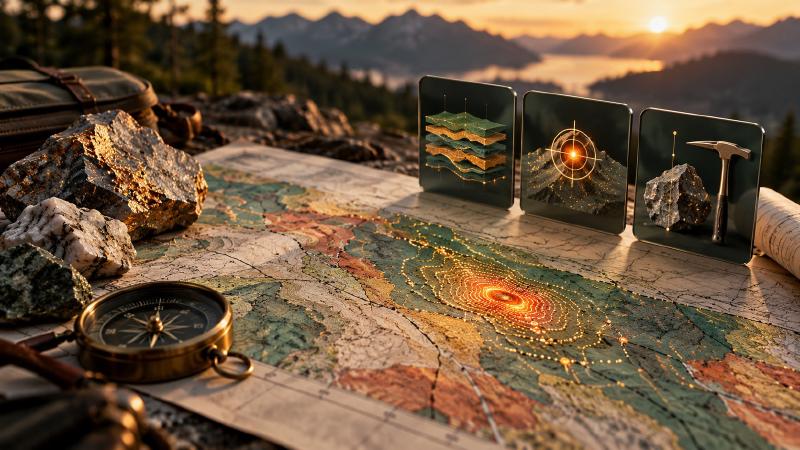
Artificial intelligence in mineral exploration covers several different jobs. One tool reads old reports or measures features in rock photographs, another ranks places to investigate, and a third collects new measurements in the field. A tool built for one of those jobs says little about the others. That is why this comparison groups eight tools by job instead of ranking them against each other.
What are AI tools for geology and mineral exploration?
AI tools for geology and mineral exploration use computer programs to help people examine geological evidence. They can measure features in rock-core photographs, search reports, compare laboratory measurements of rock and soil, or rank places to investigate. These tools help teams decide what to examine next; they do not prove a mineral deposit exists.
AI mining software vs AI tools for geology: what is the difference?
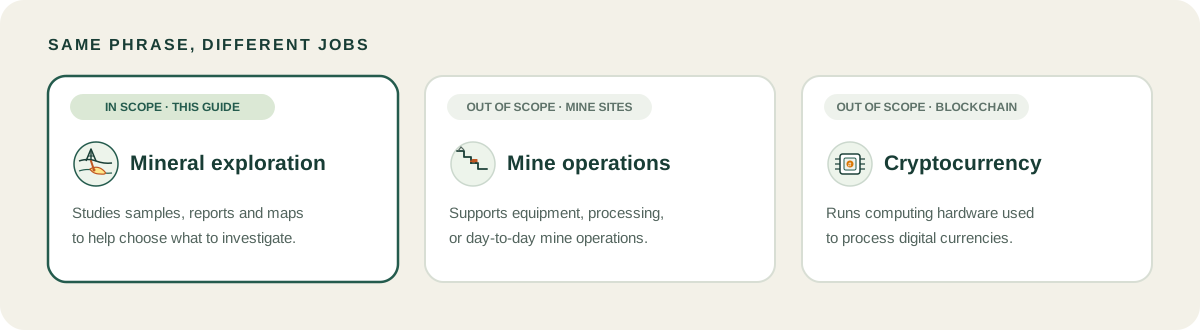
“AI mining software” can mean exploration analysis, mine operations or cryptocurrency mining. Exploration tools analyse geological evidence; operations products automate equipment or sort ore; cryptocurrency software manages computing hardware. This post covers exploration.
The word “mining” adds to the confusion. AI mining in the operations sense means automating equipment, predicting when machines need repair or sorting ore, and cryptocurrency mining uses computers to validate digital transactions. Neither helps a geologist decide where to look, so both are outside this list. If your search results fill up with cryptocurrency pages, adding “geology” or “mineral exploration” to the query removes most of them.
Best AI tools for geology and mineral exploration, compared
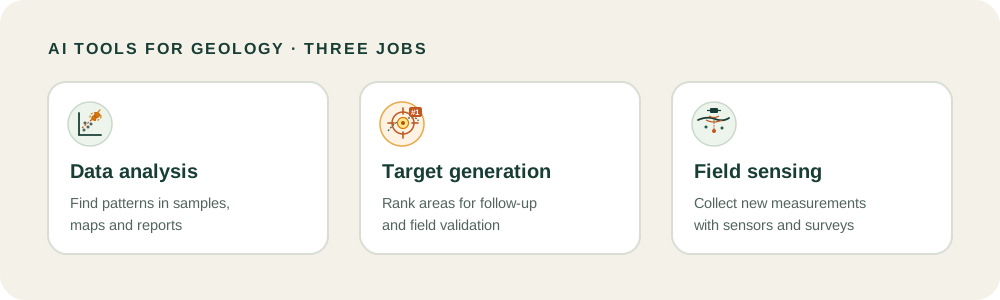
This 8-tool shortlist is not a performance ranking. Vendor pages are not independent evidence of discovery outcomes. Statistical analysis and domaining shows how choices shape interpretation.
| Tool | Best for | What it does | Data it needs | Who it suits |
|---|---|---|---|---|
| Datarock | Core imagery and prospectivity | Processes photos; models targets | Core photos; project geology | Exploration teams |
| GeoCluster | Geological data investigation | Agent analyses and visualises data | Tables, maps, reports, spatial data | Geologists investigating data |
| ioGAS | Geochemical data analysis | Visual analytics and quantitative tools | Assays and drillhole tables | Geochemists |
| RadiXplore | Historical report search | Searches archives and current information | Geological reports and datasets | Teams with large archives |
| VRIFY Predict (DORA) | Prospectivity mapping | Creates machine-learning prediction maps | Prepared project data | Exploration teams |
| Earth AI | Integrated targeting and exploration | Connects targeting with fieldwork | Geological data and exploration results | Teams seeking a partner |
| ALS Geoanalytics | Bespoke data science | AI with geoscience consulting | Client-specific geological data | Teams wanting specialist services |
| Fleet Space ExoSphere | Subsurface sensing | Combines sensors, AI and interpretation | Seismic and geological data | Teams commissioning surveys |
Geology AI for data analysis and investigation
Datarock processes core photographs into standardised imagery and measurements, and offers prospectivity modelling. Check applicable products and integrations.
GeoCluster is geology data analysis software built as an AI agent for geological investigation, with evidence traceability: measurements stay separate from interpretation. Its page describes data preparation, quality checks, spatial analysis, clustering, anomaly ranking and visualisation, with cloud and open-source options. This is the GeoCluster product, not the separate Stratigraphic Amenity map server.
The clustering and anomaly ranking belong to Eigenform’s geochemical clustering and anomaly tools, which also cover the MCP servers behind the workflow.
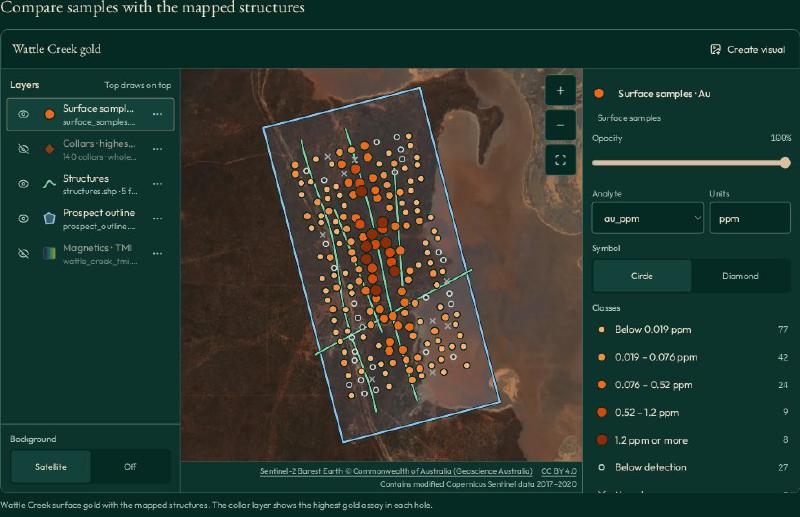
The Wattle Creek sample map shows gold assays by location alongside mapped structures.
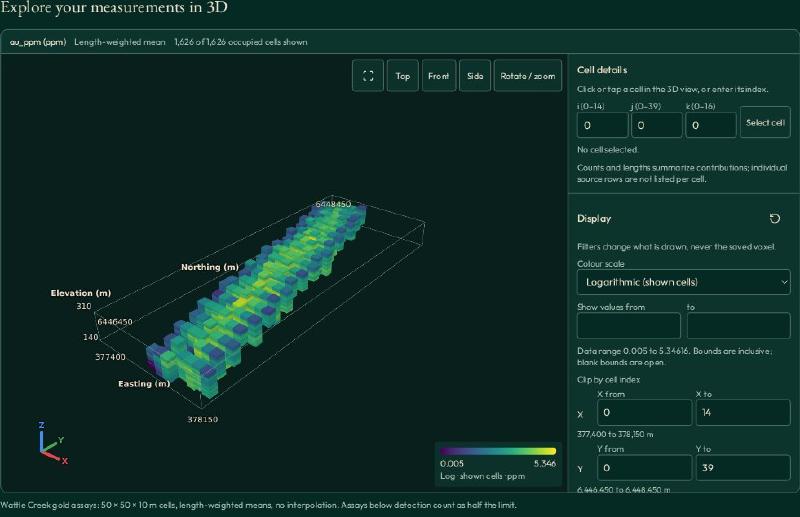
The sample view shows 50 × 50 × 10 m cells with length-weighted means and no interpolation.
ioGAS provides visual and quantitative tools for patterns, anomalies and relationships in geochemical data. It is not an autonomous targeting agent. Its link with Leapfrog Geo moves analysis into 3D modelling.
Geochemical analysis methods show how those tools fit into interpretation.
RadiXplore searches historical geological reports alongside modern information. Ask how it preserves sources and provenance, and separates source statements from generated interpretations.
AI for mineral exploration target generation
VRIFY Predict includes DORA, which creates prediction maps from project datasets. VRIFY prepares and checks data before an experiment. Confirm data handling, deliverables and target validation.
Earth AI combines targeting with fieldwork, drilling, laboratory and permitting feedback. Evaluate its service, data control and how new evidence changes decisions.
ALS Geoanalytics is the current name for the service previously called GoldSpot Discoveries. ALS combines data science and machine learning with geoscience expertise. It is a service, not a standalone product under the old name.
AI for field data and sensing
Fleet Space ExoSphere combines smart seismic sensors, multiphysics, AI and expert interpretation for exploration. Its workflow spans survey design, data acquisition and 3D subsurface insights. It suits projects that need new measurements as well as analysis, unlike software that only processes existing files.
Teams evaluating survey inputs can also review geophysics workflows.
AI in mineral exploration: where the tools help and where they stop
AI can standardise image measurements, search reports, reveal patterns and rank targets. Results depend on data and assumptions. An anomaly or target map does not prove economic value; geologists review outputs and fieldwork tests them. Ask vendors for validation methods and false positives.
AI is strongest on work that is large and repetitive: finding patterns across big datasets, measuring features across thousands of core photographs, and reading reports that nobody has time to reread. It is weakest where judgement and field evidence decide. Whether a target is worth drilling depends on geology, access, cost and risk, and those stay with the geologist.
Old paper records are a common starting point, because scanned maps and printed tables hold decades of drilling and sampling that cannot be used until they become data. Digitising old geological maps turns a scanned sheet into georeferenced GIS layers.
Reports hold tables too. Eigenform’s note on PDF table extraction shows why tables and two-column pages need different handling before software can use the text.
A worked example is Eigenform’s case study on AI recovering borehole data from Soviet-era geological maps, where hand-drawn borehole symbols on scanned sheets became coordinates once the maps were vectorised.
More examples are collected in AI mineral exploration case studies.
Some vendors describe a future where AI systems improve themselves. Recursive self-improvement is a research direction, not a capability that any tool in this list has been shown to have.
How to choose AI for mineral exploration
Choose AI for mineral exploration with four questions:
- What is the job? Analysing data you already hold, generating targets or collecting new measurements are different tools.
- Which file formats does it read? Check your drillhole tables, maps, reports and rasters against the formats the vendor lists, not against a general promise.
- How are results verified? Ask whether each result links back to the source measurement, and how the vendor tests its own outputs.
- Does it fit your existing software? Look at what goes in from your database and what comes out to your model.
A target ranking remains a hypothesis to test. A geology AI agent that keeps measurements separate from interpretation makes that test easier, because the source stays visible next to the result.
How AI mining software works with existing geology software
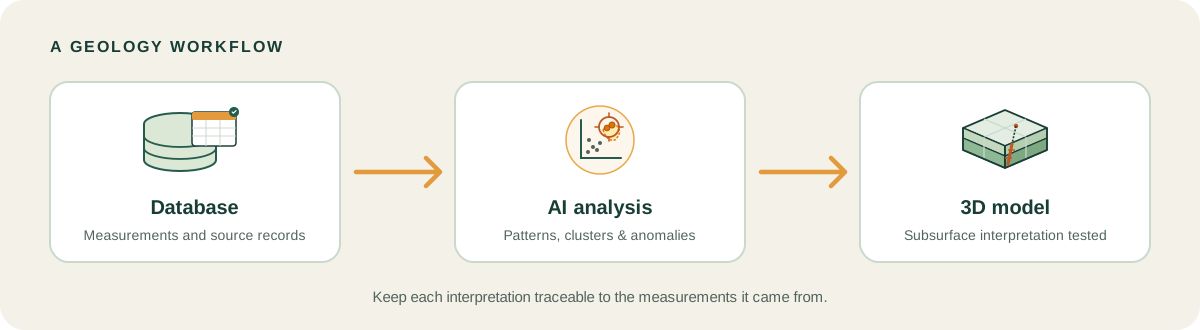
AI adds an analysis step around geology databases, GIS and modelling software; it does not replace them. Data goes in from the database, the AI step analyses it, and the results go out to the model. Check that exports fit your workflow and keep source data separate from interpretation.
An AI tool does not replace modelling packages such as Leapfrog, Micromine or Datamine. It prepares and examines data that those packages then use. For the modelling and database side of the stack, see the first post in this series on the best geology software.
Check the Tool Boundary Before You Trust the Category
The comparison depends on a simple discipline: a capability belongs to the product whose source supports it. The public Stratigraphic Amenity repository is a Python SDK and MCP server for scanned geological maps and configured knowledge lookups. It does not substantiate GeoCluster’s broader data-analysis or agent features. Treating these as interchangeable because both involve AI and geology would misstate what each tool does.
This code demonstrates one Stratigraphic Amenity workflow: checking which map capabilities are ready, registering a scanned map, and extracting its layout and legend. It does not substantiate the third-party shortlist or GeoCluster product claims. The map server exposes its scope through a registry, which makes this one tool boundary inspectable before an agent selects a workflow.
    return [
        _tool(
            "geomap_list_capabilities",
            "Discover registered, installed, configured, and ready capabilities. Call this first; inspect provider readiness, supported_requests, and missing_requirements before selecting a workflow.",
            {},
            read_only=True,
            idempotent=True,
        ),
        _tool(
            "geomap_register_map",
            "Register an existing local image under an allowed root. Persists map state and returns the only supported source resource URI.",
            {"path": {"type": "string"}},
            required=("path",),
            read_only=False,
            idempotent=True,
        ),
        _tool(
            "geomap_process_image",
            "Run HIE layout and legend extraction for one registered map. Requires map_processing.ready; persists crops and processing state for later resource reads.",
            {"map_id": {"type": "string"}, "map_uri": {"type": "string"}},
            read_only=False,
            idempotent=False,
            constraints=(_exactly_one("map_id", "map_uri"),),
        ),
The installation guide uses uv sync --group dev --extra mcp --extra geo --extra assets --extra detectors for the full development setup. An MCP client can then request capability discovery:
{"method":"tools/call","params":{"name":"geomap_list_capabilities","arguments":{}}}The response lists registered capabilities and whether each is ready, including missing requirements. This workflow is useful for deciding whether the scanned-map server can handle a map task. It is not evidence for another product’s features. The same test applies to any shortlist: verify each capability against the correct product and its current documentation before comparing it with alternatives. The Stratigraphic Amenity source repository is linked for this boundary example only.
FAQs
What is AI mining software?
AI mining software uses computer programs to examine information from geology or mining. In exploration, it may help people review rock photographs, reports, sample measurements or maps. The phrase can also describe software for running a mine or cryptocurrency computers, so check the product’s stated job before comparing it with exploration tools.
How is AI used in mineral exploration?
Exploration teams use AI to measure features in rock-core photographs, search old reports, compare laboratory results from rock or soil samples, and rank places for follow-up. These outputs help geologists decide what to inspect next. Mapping, sampling and drilling still provide the field evidence needed to assess whether a target has mineral potential.
What is the best AI tool for geology?
There is no single best tool for every geology task. Datarock focuses on images, ioGAS on analysing sample measurements, and VRIFY Predict on mapping areas for follow-up. Compare each product with your own data, the decision you need to make, how you will check its output, and the software your team already uses.
What can a geology AI chatbot do, and what can it not do?
A geology chatbot can explain terms, help search text, or discuss an image, depending on its features. GeologyOracle offers geology question and image tools and warns that answers can be wrong. A chatbot response does not replace checking original sources, analysing project data, geological review, or field evidence.
Is AI mining software the same as cryptocurrency mining software?
No. Cryptocurrency mining software uses computers to validate digital transactions and earn coins. AI mining software for geology helps people examine rock, map and sample evidence. The names overlap in search results, so check whether a product talks about geology, drillholes and samples, or about hash rates and wallets, before you trust a comparison.
Can AI find mineral deposits?
AI can rank places that look similar to known deposits in the data it was given, which helps geologists decide where to look first. It cannot confirm that a deposit exists or is worth mining. Only sampling, drilling and geological review provide that evidence, so treat a ranked target as a hypothesis to test.
Will AI replace geologists?
The tools in this comparison speed up measuring, searching and ranking, but they leave decisions to people. A geologist still judges whether a pattern makes geological sense, whether the data is reliable and whether a target is worth the cost of testing. AI shifts effort from routine data handling toward that judgement rather than removing it.
What data do AI exploration tools need?
It depends on the tool. Image tools need core photographs, search tools need digital reports, and analysis tools need tables of assays or drillhole records. Most work better when file formats are consistent and historical data is clean. Check the formats a vendor supports and the quality of your older records before you start.
Try It With Geocluster
Open GeoCluster to investigate geological data in the browser with an AI agent.
The Geocluster tools page explains the MCP servers behind these workflows, including Stratigraphic Amenity for scanned geological maps.
To try the open-source harness, follow the GeoCluster Research Harness setup on GitHub.
A visual walkthrough of the GeoCluster Research Harness shows its workflow.