Key Takeaways
- The task today: Geologists search for geological data analysis software to spot patterns in rock chemistry, drillholes and photographs, while tools like GeoCluster and open-source software help them test targets without altering raw databases.
- Analysis tools find patterns that databases cannot: A database only stores measurements safely, but specialized analysis programs discover chemical relationships and rock alterations that indicate where minerals might be hidden.
- Different rock data requires different specialist tools: Liquid and rock chemistry, drill core photos, and 3D map models each require specialized analysis software to reveal meaningful mineral trends.
- Keeping original test records protects decisions: Reliable exploration decisions require linking every computer prediction and calculated anomaly back to the original laboratory test certificate and sample location.
TL;DR
Geological data analysis software helps geologists discover mineral patterns in rock samples, drillholes and field photos after that data has been safely stored. While databases protect raw measurements, analysis tools group chemical elements and spot anomalies that indicate where to explore next. This guide compares leading analysis tools across rock chemistry, drillhole data and artificial intelligence, showing how teams turn stored numbers into practical drill targets.
What is geological data analysis software?
Geological data analysis software is specialized software that processes, evaluates, and models geochemical assays, drillhole logs, core photographs, and structural measurements after field collection. Specifically, it extracts multivariate patterns, detects geochemical anomalies, and validates spatial trends. Consequently, geologists identify exploration targets without modifying underlying primary database records.
This practical evaluation is designed for exploration geologists, project geochemists, and technical directors managing active exploration campaigns. Operational requirements differ substantially across these roles. Junior explorers working with limited drilling budgets prioritize cloud tools that spot targets quickly, whereas corporate mining teams demand strict audit trails and direct integration with corporate databases and 3D modelling suites.
Before raw data enters an analytical workflow, historical reports frequently require preprocessing. In addition, exploration teams routinely use PDF table extraction to convert legacy paper assay sheets into clean digital tables without introducing manual transcription errors.
Similarly, legacy cartography must be converted into spatial layers before automated analysis can begin. Therefore, geologists employ workflows for digitising old geological maps to turn historical raster scans into georeferenced spatial vectors.
A documented historical example is AI recovering borehole data from Soviet-era geological maps, where automated vectorization extracted hand-drawn borehole coordinates and stratigraphic intervals directly into structured tables.
Best geological data analysis software in 2026, compared by data type
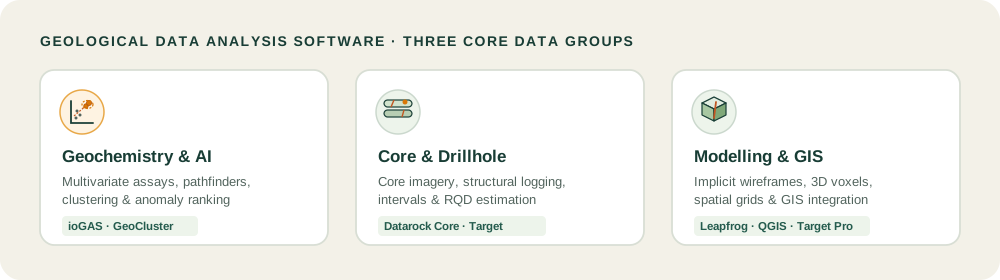
Choosing the right software requires matching your primary dataset to the appropriate analytical engine rather than searching for a single universal application. This guide evaluates seven tools based on documented product capabilities, supported file formats, and practical workflow integrations checked in 2026. The tools are organized below into three functional groups: geochemical analysis, core and drillhole analysis, and spatial modeling integration.
| Software | Primary Data Type | Core Analytical Capabilities | Provenance and Validation | Deployment Model | Best Suited For |
|---|---|---|---|---|---|
| ioGAS (Imdex) | Geochemistry, pXRF, Mineralogy | Multivariate plots, PCA, K-means, classification diagrams | Preserves raw laboratory values, links to external tables | Desktop Windows license | Specialized project geochemists |
| GeoCluster | Tabular assays, GIS vectors, Rasters | AI investigation agent, multi-element clustering, spatial anomaly ranking | Source linkage back to sample IDs and laboratory certificates | Browser-based, no install needed | Exploration teams testing target hypotheses |
| Datarock Core | High-resolution core photography | Computer vision logging, RQD estimation, fracture spacing | Auditable model versioning and API logging | Cloud SaaS platform | Drilling teams automating core photography logging |
| Target for ArcGIS Pro | Drillholes, Surface grids, Geochemistry | Coordinate transformation, downhole strip logs, 3D voxel gridding | Reconciles against Esri geodatabase rules | Desktop extension for ArcGIS Pro | GIS professionals managing regional mapping |
| Target (Seequent) | Drillhole collars, Assays, Surveys | Summary statistics, scattergrams, tri-plots, basic wireframing | Native audit tracking within Seequent ecosystem | Standalone desktop application | Field geologists running preliminary QA/QC |
| Leapfrog Geo | Drillholes, Structural points, Meshes | Implicit geological modeling, statistical compositing | Direct ODBC links to central databases | Desktop client with Seequent Central | Resource estimation and structural geologists |
| QGIS | Spatial GIS layers, Georeferenced rasters | Open-source spatial overlays, attribute filtering, python plugins | Dependent on underlying user file management | Free open-source desktop software | Budget-conscious teams and academic researchers |
Geology AI and geochemical data analysis software
1. ioGAS (Imdex)
ioGAS is widely used across the mineral exploration industry for exploratory geochemical data analysis. Geochemists rely on ioGAS to process whole-rock geochemistry, pathfinder assay suites, portable X-ray fluorescence (pXRF) readings, and downhole spectral mineralogy. The software features an extensive library of standard classification diagrams, including Pearce element ratio plots, immobile trace element ratios, and hydrothermal alteration indexes.
Its statistical toolset includes principal component analysis (PCA), self-organizing maps, K-means clustering, and automated outlier detection algorithms. Consequently, geologists use these capabilities to strip away background lithological noise and highlight subtle alteration footprints. Furthermore, ioGAS connects to downstream modeling environments, exchanging data selections with Leapfrog Geo, QGIS, ArcGIS Pro, and GOCAD Mining Suite.
2. GeoCluster
GeoCluster is an open-access AI investigation tool developed for geological datasets, available through a hosted browser interface and an open-source research harness, with custom enterprise deployment options. Operating directly inside a standard web browser without requiring local software installation or API credentials, GeoCluster ingests diverse exploration files including CSV tables, shapefiles, GeoTIFF grids, and document archives.
To explore how the underlying agent coordinates spatial reasoning, geologists can inspect the open-source geocluster research harness repository on GitHub.
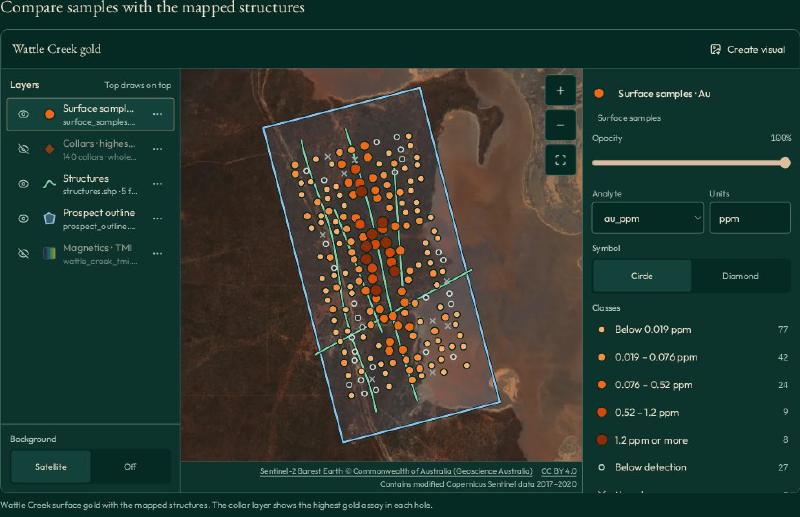
In a typical workflow, a geologist uploads tabular assay files and tenement boundaries; the browser agent runs multivariate geochemical clustering and anomaly tools, calculates length-weighted means across drillhole intervals, and ranks multi-element anomalies. For values below analytical detection limits (such as trace metals flagged as < 0.01 ppm), the platform applies a standard convention of substituting half the detection limit during statistical calculations, while flagging censored values so users can review their influence. Importantly, every anomaly score maintains explicit source linkage to the original sample coordinates and laboratory certificate numbers.
Through recursive investigation, the browser agent generates and evaluates exploration targets based on recursive self-improvement principles, linking calculated prospectivity scores directly back to original laboratory assay certificates.
Core and drillhole data analysis software
3. Datarock Core
Datarock Core applies cloud-based computer vision and machine learning models to high-resolution drill core photography. Traditionally, core logging is a subjective and labor-intensive task, vulnerable to shift-to-shift observer bias. Datarock Core automates the extraction of geotechnical and geological metrics directly from wet and dry core imagery.
The platform calculates rock quality designation (RQD), measures fracture frequency, identifies joint set orientations, and classifies structural domains from imagery. In addition, analytical modules detect lithological transitions, alteration intensity, and vein density. Consequently, by establishing consistent image interpretations across drill metres, exploration teams build structured geotechnical datasets that support downstream structural modeling and mine design.
4. Target for ArcGIS Pro (Seequent)
Target for ArcGIS Pro integrates subsurface drillhole analysis directly into the Esri GIS environment. Exploration geologists use the extension to import drilling databases, calculate downhole intervals, and generate plan maps, cross-sections, and strip logs within standard ArcGIS workflows.
The extension enables teams to visualize geochemical anomalies in 3D alongside regional geophysical grids, satellite imagery, and cadastral boundaries. Therefore, by embedding subsurface drillhole tools within an enterprise GIS, multidisciplinary exploration teams evaluate target geology without exporting spatial files across incompatible software formats.
5. Target (Seequent)
Target is a standalone desktop exploration application engineered for early-stage drillhole visualization and field mapping. Geologists use Target to QA/QC incoming collar coordinates, downhole surveys, and laboratory assay tables during active drilling campaigns.
The software provides dedicated geochemical analysis tools, including summary statistics, histograms, scattergrams, tri-plots, and correlation matrix calculations. Consequently, teams generate preliminary 3D surface wireframes and drillhole pierce points, verifying structural targets before handing off cleaned tables to advanced resource estimation teams.
Analysis inside modelling and GIS software
6. Leapfrog Geo (Seequent)
Leapfrog Geo is renowned for rapid 3D implicit geological modelling, but it also houses powerful analytical compositing engines. When geologists import raw drillhole tables, Leapfrog calculates length-weighted assay composites across defined stratigraphic horizons or mineralized envelopes.
While Leapfrog is not a replacement for dedicated geochemical software like ioGAS, its dynamic link with external tools allows geologists to visualize geochemical clusters in 3D space. As statistical domains are refined in ioGAS, updated category attributes populate Leapfrog surfaces, which helps synchronize spatial wireframes with geochemical groupings.
7. QGIS
QGIS is a free, open-source geographic information system widely utilized by exploration geologists worldwide. Supported by an extensive ecosystem of community plugins, QGIS handles coordinate reprojections, geological map overlays, raster interpolation, and spatial vector filtering.
When combined with python scientific libraries or connected to ioGAS, QGIS provides a flexible spatial analysis hub. Consequently, geologists plot drillhole collar locations, contour geochemical pathfinder anomalies, and evaluate tenement boundaries without committing to expensive annual proprietary software licenses.
How to choose geological data analysis software
Selecting the best exploration software for your team requires matching technical features to your operational workflow. Teams should evaluate candidate software using a practical evaluation checklist during software pilots:
- Ingestion and schema compatibility: Ensure candidate software natively reads CSV tables, LAS wireline logs, collar coordinates, Shapefiles, and GeoTIFFs without requiring fragile manual conversions.
- Coordinate and interval integrity: Verify that the software preserves coordinate reference systems, downhole interval depths, and analytical detection-limit flags without dropping metadata.
- Evidence traceability and provenance: Machine learning algorithms and statistical groupings must never function as unverified black boxes. The software must maintain explicit links between generated anomalies and raw laboratory certificate IDs.
- Downstream connectivity: Analysis software must not trap your data in a closed proprietary silo. Look for platforms that support live API connections, ODBC database links, or standard open exports that connect cleanly to your 3D modelling and GIS suites.
- Handling analytical limits: Review how the software handles censored values below detection limits; substituting half the detection limit is common, but users must be able to inspect its impact on clusters.
- Deployment overhead and total cost: Enterprise desktop suites demand days of specialized training and high-performance workstations. When teams require rapid field deployment, lightweight cloud or browser-based tools offer immediate productivity gains.
To deploy autonomous AI agents that run alongside these analytical workflows, teams can evaluate the geology AI agent documentation to understand how language models coordinate exploration tools.
How geological data analysis software fits with databases and modelling tools
Geological data analysis software operates as the essential bridge in a modern three-stage exploration workflow:
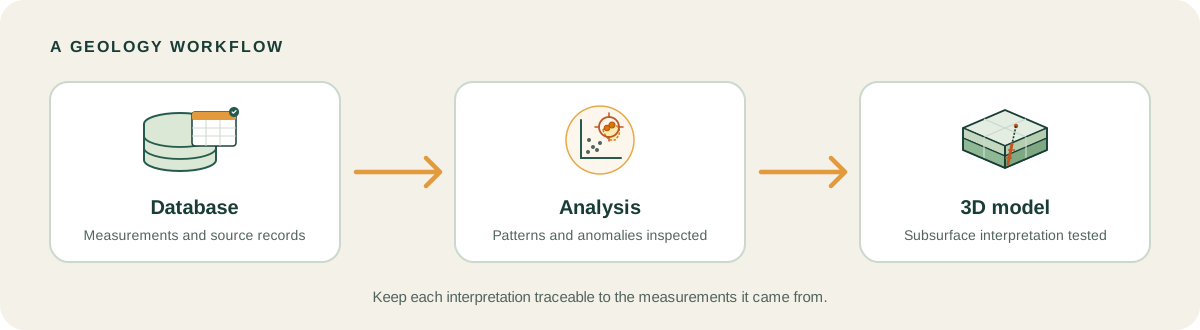
The workflow begins in the database layer. Specifically, dedicated geological data management platforms capture, validate, and store raw empirical measurements, ensuring collar coordinates and assay batches remain uncorrupted and auditable.
Next, geological data analysis software connects directly to clean database tables. Rather than modifying raw records, the analysis engine operates in a read-only mode, calculating multivariate clusters, downhole composites, and pathfinder ratios in memory or in derived interpretation tables.
Finally, validated anomalies and structural domains export directly into best geology software packages to construct 3D implicit models, mineralized wireframes, and resource grade estimates. In practice, this process is iterative: 3D structural interpretations frequently highlight unexpected grade boundaries, prompting geologists to revisit geochemical clustering and re-composite drillhole intervals.
To inspect how validated drillhole intervals and geochemical clusters translate into three-dimensional space, geologists can explore an interactive 3D voxel model demo that visualizes exploration targets from surface down to depth.
Spatial coordinate resolution in Stratigraphic Amenity
Automated data analysis requires rigorous validation of coordinate reference systems before processing begins. This capability is demonstrated in Stratigraphic Amenity, an open-source MCP server that gives AI agents tools for geological investigation.
When an exploration analysis pipeline evaluates geochemical assays or regional occurrences, coordinate reference system (CRS) mismatches can misplace anomalies by hundreds of metres. Stratigraphic Amenity enforces deterministic coordinate resolution in src/stratigraphic_amenity/georef/crs.py:42-62:
    if isinstance(spec, bool):  # bool is an int subclass; reject explicitly.
        raise CRSResolutionError(f"Invalid CRS specification: {spec!r}")
    if isinstance(spec, int):
        return f"EPSG:{spec}"
    if not isinstance(spec, str) or not spec.strip():
        raise CRSResolutionError(f"Invalid CRS specification: {spec!r}")

    text = spec.strip().lower()

    epsg_match = re.fullmatch(r"epsg:\s*(\d+)", text)
    if epsg_match:
        return f"EPSG:{int(epsg_match.group(1))}"

    if "utm" in text:
        zone_match = re.search(r"zone\s*0*(\d{1,2})", text)
        if not zone_match:
            raise CRSResolutionError(f"Could not find a UTM zone in {spec!r}")
        zone = int(zone_match.group(1))
        if not 1 <= zone <= 60:
            raise CRSResolutionError(f"UTM zone {zone} out of range (1-60) in {spec!r}")
Furthermore, spatial queries to external databases require bounding box validation to prevent malformed coordinates from triggering silent query failures. In src/stratigraphic_amenity/knowledge/bounds.py:24-40, the Bounds dataclass validates geographic bounds in decimal degrees before knowledge retrieval begins:
@dataclass
class Bounds:
    min_lon: float
    min_lat: float
    max_lon: float
    max_lat: float
    crs: str = "EPSG:4326"

    def __post_init__(self) -> None:
        try:
            self.min_lon = float(self.min_lon)
            self.min_lat = float(self.min_lat)
            self.max_lon = float(self.max_lon)
            self.max_lat = float(self.max_lat)
        except (TypeError, ValueError) as exc:
            raise InvalidBoundsError("Bounds values must be decimal degree numbers.") from exc
By enforcing strict coordinate resolution and bounding constraints at the code level, Stratigraphic Amenity provides defensive input validation, ensuring that automated geochemical analysis agents operate on geometrically valid spatial records.
FAQs
How is geological data analysis software defined?
Geological data analysis software is specialized software designed to evaluate, statistically model, and interpret exploration datasets such as rock geochemistry, drillhole assays, and core imagery. It identifies multivariate anomalies, structural trends, and mineralized patterns to generate drill targets while keeping raw primary database records protected and uncorrupted.
What is the best software for analysing geochemical data?
The best software for analysing geochemical data depends on workflow requirements. ioGAS is widely recognized for specialized multivariate plots, principal component analysis, and alteration classification diagrams. For teams seeking browser-based automated investigation, GeoCluster provides AI agent clustering and anomaly ranking that connects directly to tabular exploration datasets without requiring software installation.
Can I analyse drillhole data in QGIS or ArcGIS?
Yes, you can analyse drillhole data in QGIS and ArcGIS Pro using dedicated extensions and plugins. Target for ArcGIS Pro allows geologists to import drilling tables, generate cross-sections, and visualize downhole assays in 3D. In QGIS, community plugins and python scripts enable collar plotting, strip logging, and spatial filtering.
What is the difference between geological data analysis and data management software?
Geological data management software stores, validates, and audits factual records such as collar surveys, assay certificates, and drill logs to prevent data loss. In contrast, geological data analysis software queries those clean records to execute statistical clustering, detect trace-element pathfinders, and test geological targeting hypotheses.
Is there free geological data analysis software?
Yes, QGIS is a free, open-source GIS platform widely used for spatial geological data analysis and mapping. Additionally, GeoCluster provides free browser-based exploration and open-source repositories on GitHub, allowing exploration geologists to evaluate AI-assisted investigation workflows without purchasing expensive proprietary commercial desktop software licenses.
Can AI analyse geological data, and how do I check the result?
AI can analyse geological data by running automated clustering, multivariate anomaly detection, and core photography classification across large exploration datasets. You check results by verifying evidence traceability: every machine-generated anomaly score must link directly back to the original physical sample, laboratory certificate, and drillhole collar coordinates.
What file formats does geological data analysis software read?
Geological data analysis software typically reads tabular files like CSV and Excel, spatial formats including Shapefiles, GeoJSON, and GeoPackages, raster grids like GeoTIFF and ER Mapper, and specialized logging formats such as LAS wireline files and high-resolution photographic image formats.
Try It With Geocluster
Open GeoCluster to investigate geological exploration data directly in your web browser with an AI agent, without requiring software installation or server configuration.
To discover how modern exploration software connects across every stage of the mining lifecycle, explore our companion review on best geology software for active field teams.