Key Takeaways
- The task today: Choosing geology software means matching tools to jobs such as storing drillhole data, analysing samples, processing surveys, making maps and building 3D models. Stratigraphic Amenity is an open-source MCP server that lets an AI agent request selected geological records for a map area; it handles one part of that wider workflow.
- The problem: These tools often serve different roles, so teams need to check how data moves between them and whether a result can be traced to its source. A 3D model or AI suggestion still needs review against the underlying observations.
- What the tool does: Stratigraphic Amenity accepts map bounds or other query context and returns a bundle of records with sources, counts and warnings from configured providers. Its coverage depends on those providers, and an empty result does not prove that nothing is present.
TL;DR
Choosing geology software means matching each tool to the job, from keeping drillhole records to analysing survey data and building 3D models. Stratigraphic Amenity is an open-source MCP server that lets an AI agent request selected geological records for a map area, then returns sources and warnings for review. It adds one evidence-retrieval step to a larger workflow and does not replace databases, GIS, geophysics or modelling tools.
Last updated: October 19, 2026
What is geology software?
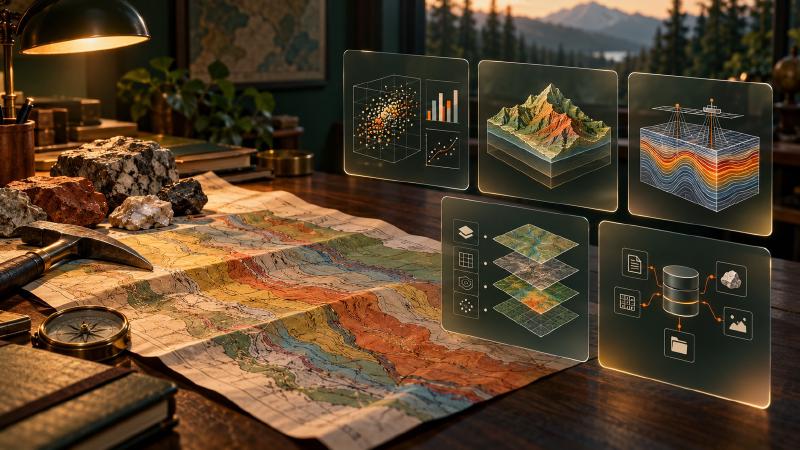
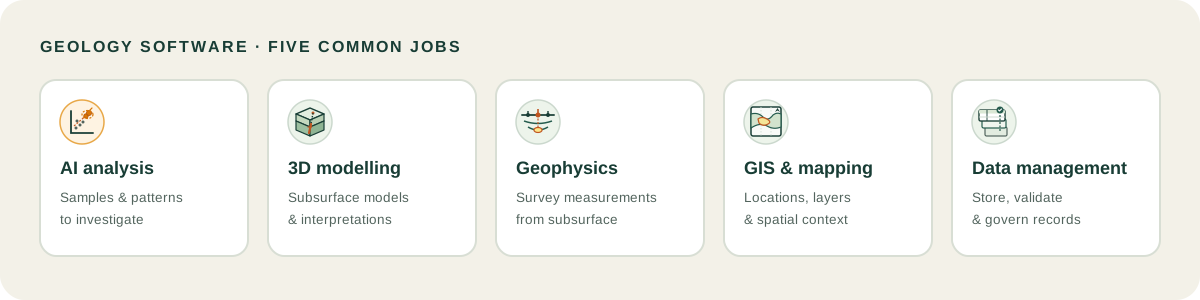
Geology software is a set of programs that store drillhole and sample records, analyse them, process surveys, draw maps and build 3D models of the subsurface. Most teams use geological software from several of the five job groups below, because no single product covers every task.
Best geology software in 2026: 12 tools compared by use case
| Tool | Best for | Key strengths | Limits | Who it suits |
|---|---|---|---|---|
| ioGAS | Geochemical analysis | Visual analytics, statistics and drillhole plots | Verify export formats and data handoff for your workflow | Exploration geochemists |
| GeoCluster | AI-assisted geological data investigation | Agent-based analysis; open-source research harness | Confirm configured providers and geographic coverage; review retrieved evidence | Geologists investigating datasets with human review |
| Datarock | Core imagery analysis | Extracts geological and geotechnical data from photographs | Focused on core imagery workflows | Core logging teams |
| Leapfrog Geo | 3D geological modelling | Dynamic implicit modelling and visualization | Model quality depends on inputs and assumptions | Exploration and mine geologists |
| Micromine Origin | Exploration and resource modelling | Geological modelling, geostatistics and estimation | Confirm modules, subscription and data exchange | Exploration and resource teams |
| Datamine Studio RM | Resource modelling | Explicit and implicit modelling, estimation | Check formats and workflow fit | Resource and production geologists |
| GEOVIA Surpac | Geological modelling and mine planning | Drillhole management, resource models and mine designs | Broad mining scope may exceed an early-stage need | Geologists and mine planners |
| Oasis montaj | Geophysical survey work | Processes and interprets magnetic, gravity, EM, resistivity and radiometric data | Specialist geophysics role | Geophysicists and exploration teams |
| QGIS | GIS and cartography | Free, open-source mapping and spatial analysis | Plugin and support ownership needs planning | Teams needing flexible GIS |
| ArcGIS Pro | Enterprise GIS | Mapping, analysis, data management and collaboration | Consider licensing and the wider Esri environment | Organizations using Esri workflows |
| acQuire GIM Suite | Geological information management | Governed exploration and mine geology records | Does not replace analysis and modelling tools | Exploration companies and mines |
| MX Deposit | Drillhole and sample data management | Logging, validation and sharing, including field use | Verify schema, integrations and export path | Teams collecting drilling data |
Geology data analysis software and AI tools
ioGAS
ioGAS is IMDEX’s exploratory data analysis software for the resources industry. It uses visual analytics and quantitative tools to show patterns, anomalies and relationships in geochemical and other geoscience data, so a geochemist can test ideas quickly before committing to a model. In practice, it can pull data from acQuire’s GIM Suite and exchange results with Leapfrog Geo and Micromine through separate links. Together with IMDEX’s aiSIRIS, it can also merge spectral mineralogy with geochemistry. Check which versions and add-ons your site licenses, since the links are sold separately.
GeoCluster
GeoCluster is a browser-based AI agent for geological investigation, with an open-source research harness and an Enterprise version. The browser version needs no installation or API keys. It extracts working tables from uploaded PDF reports and spreadsheets, then helps compare sample populations, rank drill intercepts and inspect drilling in 3D. Measurements stay separate from interpretation, so results trace back to the original assays and collars. Drillhole results use length-weighted means, and assays below detection count as half the limit. It is a geology data analysis software option, not a database or modelling package.
The open-source GeoCluster Research Harness lets teams run the agent with their own model and add tools.
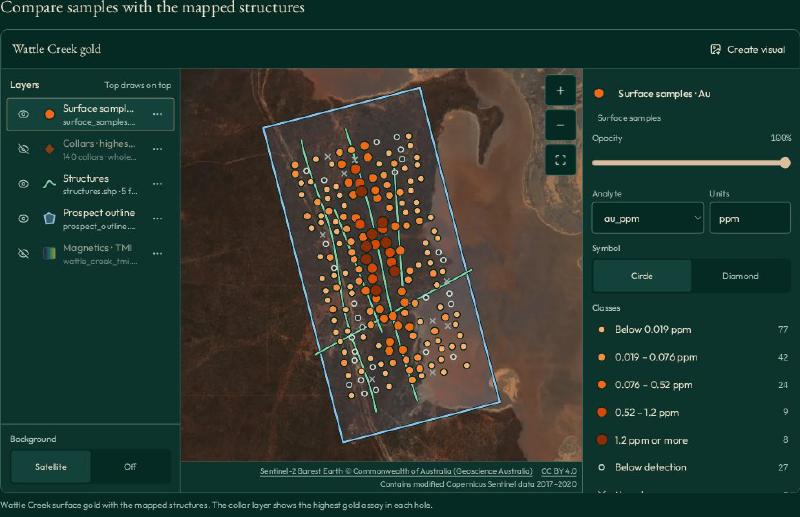
The Wattle Creek sample map shows gold assays by location alongside mapped structures.
Datarock
Datarock applies computer vision to drill core photographs. Its base subscription covers image preparation, such as cropping and dewarping, depth registration, and a geotechnical bundle with rock quality designation (RQD), fracture mapping and joint set analysis. Add-ons detect lithology, veins, alteration and texture, and data fusion options combine imagery with geochemistry or core scanner data. It also offers an API for imagery storage and databases, plus batch processing that runs on demand or at regular intervals. Its outputs describe the photographed core only, so logging teams still review them.
3D geological modelling software
Leapfrog Geo
Leapfrog Geo from Seequent builds 3D geological models with implicit modelling, which creates surfaces directly from drillholes, points and structural measurements. Models recalculate when new data is imported. It brings drillhole databases, GIS lines, maps, block models and geophysics into one workspace, and geologists can apply rules such as surface chronology. Outputs include 3D images, cross-sections and interactive scenes for technical and non-technical audiences, and projects can be published to Seequent Central for version tracking. Model quality still depends on the inputs and the interpretation applied.
Micromine Origin
Micromine Origin is a suite for mineral exploration. It covers data manipulation and visualisation, geological modelling, resource modelling and geostatistics, and Micromine says it helps users integrate, validate, interpret and communicate resource data. It sits alongside Micromine Beyond, a mine design suite for mining engineers, on a shared platform. Origin is aimed at exploration geologists, and Beyond at mining engineers handling optimisation, design and surveying. Micromine also describes using AI to turn geological knowledge into models. Confirm which modules, subscription terms and exchange formats your project needs.
Datamine Studio RM
Datamine Studio RM is a resource modelling product for geostatisticians, resource and reserve geologists, production geologists and planning engineers. It offers block modelling, geostatistical analysis, implicit modelling, grade estimation and wireframe solids built manually or automatically from drillholes. The product links to drillhole databases, imports many data formats and supports scripts and macros for repetitive tasks. For teamwork, MineTrust shares and synchronises project files. Studio RM is sold standalone or inside Studio RM Pro. Check format support and how it fits your estimation workflow.
GEOVIA Surpac
GEOVIA Surpac from Dassault Systèmes is a 3D mine planning and geological modelling suite for open pit and underground mining. It combines drillhole data management, geostatistics, resource modelling and reserve reporting with mine design, blast patterns, stope optimisation and surveying. Scripting automates workflows, and it handles point clouds and meshes. Its users include geologists, mine engineers and production teams. Its range suits teams that move from geology into planning, and the wide scope may exceed what an early-stage exploration team needs or wants to pay for.
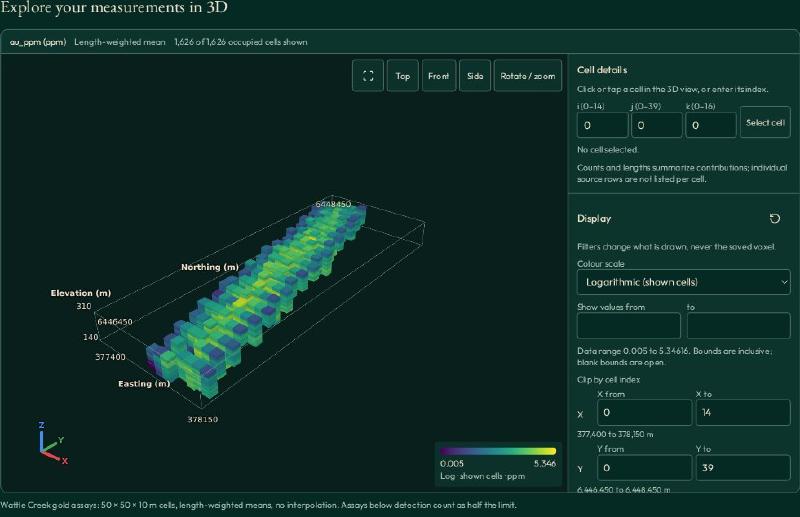
The sample view shows 50 × 50 × 10 m cells with length-weighted means and no interpolation.
Geophysics software
Oasis montaj
Oasis montaj from Seequent is desktop software for processing, modelling and interpreting magnetic, gravity, electromagnetic, resistivity and radiometric data in one project environment. It supports survey planning and field quality control, works with over 50 industry formats, makes 2D and 3D maps and builds voxel models. Scripts can use GX or embedded Python, extensions add method-specific tools, and data can move to Leapfrog. Inversions can run in the cloud through VOXI. It is a specialist tool for geophysicists, not a general mapping package.
GIS and mapping software for geology
QGIS
QGIS is a community-owned, free and open-source GIS licensed under GNU GPLv2+, available on Windows, Mac and Linux. It offers map design, a print layout designer, digitizing of points, lines, polygons and meshes, an analysis toolset and support for many data formats and web services. It runs on Windows, Mac and Linux without a licence fee, and it has no geological database schema, so teams plan plugins, support ownership and drillhole handling themselves, which takes some effort. Its web services support also helps share maps to the cloud and mobile devices.
ArcGIS Pro
ArcGIS Pro is Esri’s Windows desktop GIS for mapping, spatial analysis and data management. It handles 2D and 3D maps, imagery analysis, versioned data and multiuser editing, and supports Python and ModelBuilder automation, add-ins and a .NET SDK. Built-in AI models support imagery and analytics work. It also runs Jupyter Notebook workflows. Access runs through ArcGIS user type licences at Basic, Standard and Advanced levels. It suits organisations already using the wider Esri platform; weigh licensing, the Windows-only requirement and that dependency before adopting it. Teams can also render knowledge results onto a geological map.
Geological data management software
acQuire GIM Suite
acQuire GIM Suite is enterprise geological data management software used by large miners to capture, manage and deliver geological information. It applies validation rules at data entry, stores records centrally in an auditable form and works on desktop, web and mobile, with an offline mobile app. It handles collars, sampling results, geotechnical data and downhole geophysics, and supports batch laboratory submission. Workflows can be configured without custom code, and data can be exchanged with third-party systems. It stores and governs records but does not analyse or model them.
MX Deposit
MX Deposit from Seequent is a cloud-based database for drillhole and point-sample data. It combines well, open hole, core and geology logging with built-in validation, and offers Android and iOS logging apps that work online and offline. A portal manages tables, validation rules and access for joint venture projects, and assays get ongoing QAQC reporting against certified benchmarks. Reports and project summaries can be downloaded, and a read-only reviewer option exists. Verify schema, integrations and export paths before moving existing data.
Tool group map: Analysis and AI: ioGAS, GeoCluster, Datarock. 3D modelling: Leapfrog Geo, Micromine Origin, Datamine Studio RM, Surpac. Geophysics: Oasis montaj. GIS: QGIS, ArcGIS Pro. Data management: acQuire, MX Deposit.
How to choose geoscience software for your workflow
Four criteria narrow the list:
- The job: collection, analysis, mapping, modelling or planning.
- File formats: test drillhole tables, rasters, coordinates and exports with real project files.
- Verification: decide who checks source records, assumptions and AI outputs.
- The wider stack: map the handoffs from data capture to reporting, including ownership.
Best geology exploration software for each type of team
The best geology exploration software is usually two or three tools matched to the team.
- Junior explorer: QGIS for mapping, ioGAS for geochemistry and an AI agent such as GeoCluster for investigating datasets, keeping costs low.
- Mine geologist: a database such as acQuire or MX Deposit, a modelling tool such as Leapfrog Geo, Datamine Studio RM or Surpac, and a way to reconcile with production.
- Consultant: portable formats and tools clients already use, often QGIS or ArcGIS Pro plus a modelling package.
How geology AI tools and geology software work together
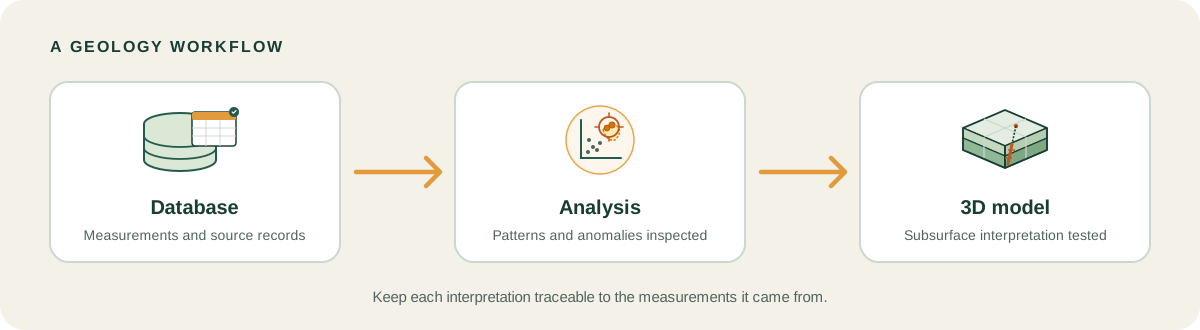
A common pattern is database → analysis → model: preserve measurements, investigate patterns, then represent an interpretation in 3D. Teams revisit earlier steps when new data arrives, so results should stay tied to source data.
AI tools may eventually improve through recursive self-improvement (RSI), where an agent learns from feedback on its own work. This is a research direction, not something GeoCluster does today.
FAQs
What is the best geology software?
There is no single best geology software for every team. Match tools to the job: data management for records, analysis for samples, geophysics for surveys, GIS for maps and modelling for the subsurface. Then test formats and handoffs with representative project data before buying.
What is the best free geology software?
QGIS is free, open-source GIS software for mapping and spatial analysis. It does not replace geology databases, geophysics packages or 3D modelling systems. A free GIS may cover a team’s mapping, while drillhole data management, modelling and geophysics still need dedicated tools.
What is the difference between geology software and geoscience software?
The terms overlap heavily. Geology software usually means tools for rocks, drillholes and subsurface models, while geoscience software also covers geophysics, geochemistry and GIS. Vendors use both labels, so compare what a product does with your data rather than its category name.
What software do exploration geologists use?
Exploration geologists often combine a database, geochemical analysis, geophysics, mapping and 3D modelling tools. The mix depends on the project and data. Check how each package imports drillhole tables, handles coordinates, preserves source information and exports results for other specialists.
What is geological database software?
Geological database software stores and validates drillhole, sampling and assay records in one governed place. acQuire GIM Suite and MX Deposit are examples. They keep records consistent and auditable, but they do not interpret results, so teams still need analysis and modelling tools.
Can AI replace traditional geology software?
Not on its own. AI can help with bounded work such as extracting tables, exploring datasets or suggesting patterns for review. It does not replace geological databases, GIS, geophysics or modelling tools. Treat its output as a lead, check sources, and have a qualified person assess it.
What software do I need to analyse geochemical data?
Start with a data management system for clean assay records, then an analysis tool. ioGAS is built for exploratory geochemical analysis, and an AI agent such as GeoCluster can help compare sample populations. GIS then maps the results. Check detection-limit handling and data export first.
What is recursive self-improvement (RSI) and does it apply to geology software?
RSI describes an AI agent that learns from feedback on its own work. It is a research direction for AI tools, not a feature of the geology software compared here. GeoCluster does not claim to do it today, so judge products on current, verifiable capabilities.
Try It With Geocluster
Open GeoCluster to investigate geological data with an AI agent.
The Geocluster Tools page explains its supporting MCP servers, including Stratigraphic Amenity, an open-source server that lets an agent request selected geological records for a map area.