Key Takeaways
- The task today: Choosing geophysics software for mineral exploration. Geophysics software reads measurements of the ground’s magnetism, density and electrical response, taken from aircraft or at the surface, and helps geologists work out what lies underground without drilling.
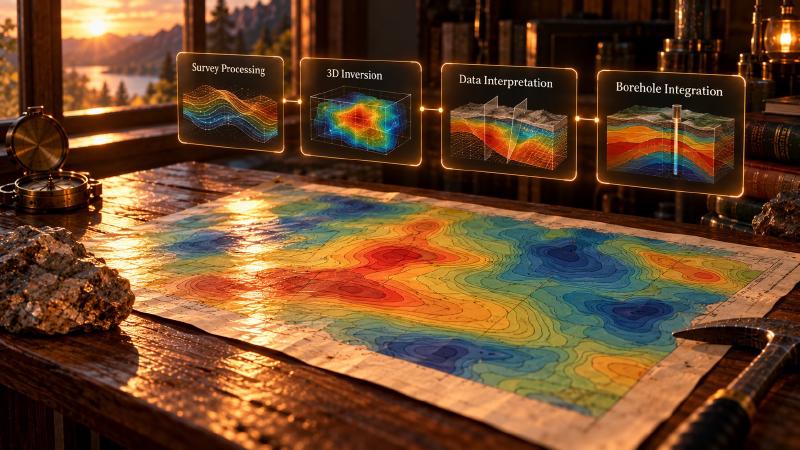
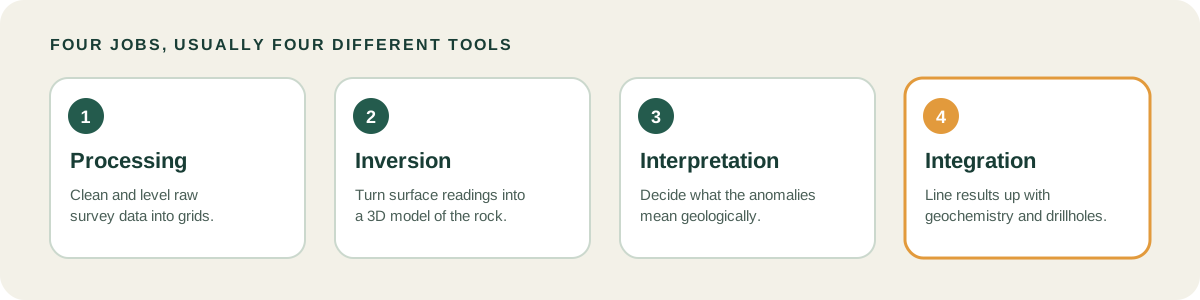
- No single tool does everything: Four separate jobs are involved: cleaning the survey data (processing), turning it into a 3D picture of the rock (inversion), reading that picture (interpretation), and checking it against rock samples and drillholes (integration).
- Free options exist: Some inversion tools are open-source Python libraries, which cost nothing but need programming skill. Others are licensed.
- GeoCluster covers integration: GeoCluster is a browser-based AI agent for geological investigation that works with geophysics grids, geochemistry and drillhole data. It does not process survey data or run inversions.
TL;DR
Geophysics software for mineral exploration turns raw survey measurements, such as magnetic readings taken from an aircraft, into models of what lies under the ground. Different programs handle different stages: processing, inversion, interpretation and integration with geochemistry and drillhole data. This guide compares seven tools by job, and shows where GeoCluster, a browser-based AI agent for geological investigation, fits alongside them.
What is geophysics software for mineral exploration?
Geophysics software for mineral exploration is a set of programs that clean, model and interpret measurements of the ground’s physical properties. It handles magnetics, radiometrics, gravity, electromagnetics (EM) and induced polarization (IP) surveys. Teams also call it geophysical software.
No single program does every task. The work splits into four jobs, and most tools are built for one or two of them.
| Job | What it means | Output |
|---|---|---|
| Processing | Cleaning and levelling raw survey data | Grids and rasters |
| Inversion and modelling | Turning surface measurements into an estimated 3D picture of physical properties | Models |
| Interpretation | Deciding what the anomalies mean geologically | Targets and hypotheses |
| Integration | Lining the results up with geochemistry and drillholes | Evidence for or against a target |
Best geophysics software for mineral exploration, compared
The table covers seven tools. It describes what each one is built for and what its maker says it handles. No scores or ratings are given, because no sourced ones exist.
| Tool | Best for | Survey and data types | Inversion | Who it suits |
|---|---|---|---|---|
| Geoscience Analyst | Viewing geophysics, geology and geochemistry together in 3D | Geological, geophysical, geochemical and geotechnical data | In the paid Pro Geophysics option | Teams that want a free 3D viewer, with paid upgrades |
| GeoCluster | Integration and interpretation in the browser | Geophysics grids and rasters, geochemistry, drillholes | No | Geologists combining grids, geochemistry and drillholes |
| Target | Drillhole and field data for early-stage exploration | Drilling, geology, geophysics and geochemistry data | Not listed | Exploration geologists |
| Oasis montaj | Magnetic data processing and survey processing | Magnetics, gravity, EM, resistivity, radiometrics | Through VOXI, a separately licensed cloud service | Geophysicists processing airborne and ground surveys |
| pyGIMLi | Multi-method modelling and inversion in Python | Resistivity, IP, seismic refraction, gravity, magnetics, EM | Yes | Users comfortable with scripting |
| SimPEG | Simulation and inversion in Python | Gravity, magnetics, DC resistivity, IP, EM | Yes, modular and gradient-based | Users comfortable with scripting |
| UBC-GIF | Licensed inversion codes | Gravity, magnetics, DC resistivity, IP, EM, MT, ZTEM | Yes, forward modelling and inversion | Teams with a commercial or academic licence |
Geophysics software that connects grids to geochemistry and drillholes
A geophysical grid on its own shows where a measurement changes. It does not say why. The tools in this group put grids next to geochemistry and drillholes, so a geologist can compare an anomaly with samples taken from the ground.
1. Geoscience Analyst
Geoscience Analyst is made by Mira Geoscience, a geological and geophysical software and consulting company based in Quebec. The base version is a free 3D viewer: you can import, view, annotate, save and share geological, geophysical, geochemical and geotechnical data and models in one 3D scene.
Paid Pro options add analysis tools. Pro Geophysics adds geologically constrained geophysical modelling and inversion, so the same program can move from viewing to modelling. Mira also offers a free Pro version for academic users.
It suits teams that want one 3D view of all their data at no cost, and that may later need inversion inside the same environment.
2. GeoCluster
GeoCluster is a browser-based AI agent for geological investigation, with open-source and Enterprise versions. The browser version needs no installation and no API keys. It is geology data analysis software for the integration job, not a processing or inversion tool.
It reads geophysics grids and rasters, including GeoTIFF, ER Mapper and NumPy volumes, along with CSV, XLSX, Shapefile and GeoPackage tables. LAS is not listed.
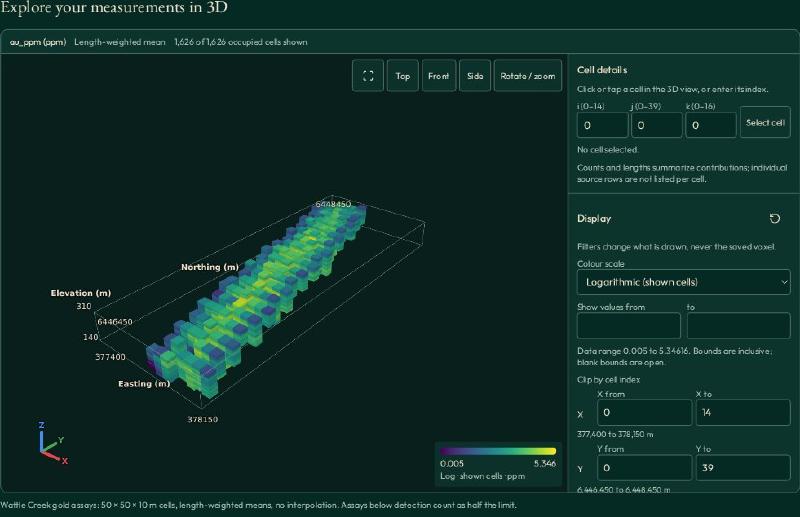
For assays it uses length-weighted means, treats below-detection values as half the detection limit, and keeps each conclusion traceable to its data.
Use it for geophysics grids and 3D voxel viewing next to drillhole data, alongside a processing tool and an inversion tool.
3. Target
Target is Seequent’s geological field mapping and drillhole visualisation software for early-stage exploration. Seequent is Bentley’s subsurface software company, and Target is still sold and updated.
It imports and organises drilling data, runs quality checks and composites, and draws plan maps, sections and 3D views. It can also build simple 3D geological models, voxel and block models, and plan new drillholes.
Seequent says it reads more than 50 formats, covering drilling, geology, geophysics, geochemistry, GIS, satellite imagery and CAD files. It includes geochemical statistics such as histograms and principal component analysis. It is designed to work alongside Oasis montaj, so grids from processing can sit next to drillholes.
Magnetic data processing software and survey processing
Processing comes first in the chain. Raw survey data holds noise and offsets between flight lines, and it has to be cleaned and levelled before anyone models it.
4. Oasis montaj
Oasis montaj is Seequent’s desktop software for processing, modelling and interpreting geophysical data. It handles magnetic, gravity, electromagnetic, resistivity and radiometric data from airborne and ground surveys, from field quality checks through to maps and profiles.
Seequent says it reads more than 50 industry data formats and handles large datasets, up to national-scale surveys. Geological and geochemical data can be loaded in the same project.
For 3D inversion it connects to VOXI, a cloud service licensed separately and paid by use. VOXI modules cover gravity and magnetics, IP and resistivity, gravity gradient, and time-domain and frequency-domain EM. Results come back into Oasis montaj for interpretation. Processing cleans the data; it does not say what the data means.
Geophysics inversion and modelling software
Inversion works backwards. Instead of predicting what a known rock body would measure at the surface, it starts from the surface measurements and estimates the physical properties underground that could explain them. Several different models can fit the same data, which is why interpretation is a separate job.
5. pyGIMLi
pyGIMLi is an open-source Python library for multi-method modelling and inversion in geophysics, released under the Apache 2.0 licence. It runs on Windows, Linux and macOS.
Its examples cover electrical resistivity tomography in 2D and 3D, induced polarization, seismic refraction traveltime tomography, gravity and magnetics, electromagnetic methods and magnetic resonance sounding. That breadth makes it a good fit for near-surface and hydrogeology work as well as mineral targets.
Because it is a library, you write scripts to load data, build meshes and run inversions. That gives you full control over the model, but it takes programming skill and some time to learn.
6. SimPEG
SimPEG, short for Simulation and Parameter Estimation in Geophysics, is an open-source Python package for simulation and gradient-based inversion. Its site lists gravity, magnetics, direct current resistivity, induced polarization and electromagnetics, including time-domain, frequency-domain and natural-source methods.
Its inversion framework is modular, with components for data misfits, regularization, optimization and joint inversions. It supports tensor, OcTree, QuadTree and cylindrical meshes, and it exports to VTK. Like pyGIMLi, it asks you to write Python, so it suits teams that want to build and control their own inversion workflow in code.
7. UBC-GIF
UBC-GIF is the Geophysical Inversion Facility at the University of British Columbia, an academic research unit that has worked on forward modelling and inversion for potential field and electromagnetic data for over 30 years. It licenses a suite of Fortran-based inversion codes.
The codes cover gravity, magnetics, DC resistivity and IP, frequency-domain and time-domain EM, magnetotellurics and ZTEM. They run on Windows and Linux. Commercial use needs a commercial licence, and free academic licences cover some of the packages but not all. That makes UBC-GIF a licensed option, not a free one.
Free and open-source geophysics software
The free and open-source options above are pyGIMLi and SimPEG. Both are Python tools, so they suit teams that can script. Expect to write code to read your survey files and to display 3D results. The base version of Geoscience Analyst is also free, as a viewer rather than a modelling tool. UBC-GIF is a licensed option, not open source: commercial use needs a paid licence, and free academic licences cover some packages only.
If you search for geophysics software free of charge, the cost saving comes with a skills cost. Many exploration teams pair a free inversion library with a viewer for the integration step.
Geophysical data interpretation: using geophysics with geochemistry and drillholes
Geophysical data interpretation is where many projects stall. A magnetic anomaly can come from rock that carries ore, but it can also come from rock that does not. The grid alone cannot settle it.
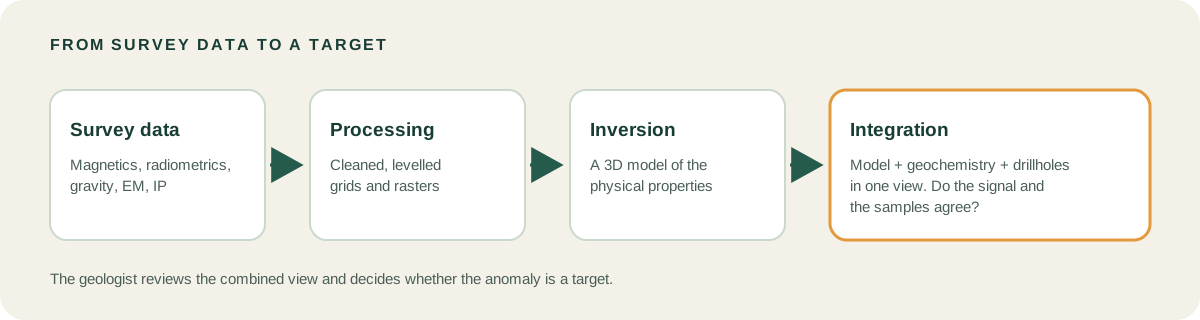
Integration is how you settle it. Put the inverted model next to geochemistry and drillhole logs, then ask whether the physical signal lines up with the chemistry and with what the drill found. A 3D voxel model demo shows what that kind of view looks like, with a 3D volume of cells that carry values.
A practical sequence looks like this:
- Process the survey data into clean grids.
- Invert the grids into a 3D model of physical properties.
- Load the model, the geochemistry and the drillholes into one view.
- Check where the signal and the samples agree, and where they do not.
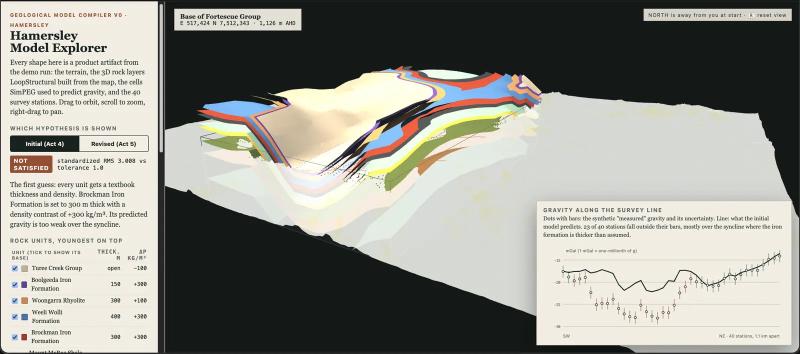
The model explorer in Eigenform’s Coe Fairbairn case study shows what that check looks like. It draws 3D rock layers built from a map, and plots the gravity those layers should produce along a survey line against 40 measured stations. In the first model, many stations fell outside their error bars, which is the signal to revise the model.
Historical maps feed the same step. Automated geological map processing can bring older scanned maps into the project, so structural trends sit beside the geophysics.
How to choose the best exploration software for geophysics
Most general lists of the best exploration software skip geophysics, so build your shortlist from the job instead. Four criteria cover most of the decision:
- Survey types. Match the tool to the method you collected, whether magnetics, radiometrics, gravity, EM or IP.
- File formats. Check which grid, raster and survey formats the tool reads, and which it writes. Conversion between tools is a common point of failure.
- Inversion needs. Decide whether you need to run inversions yourself or only view models someone else produced.
- Fit with the modelling tool. The geophysics output has to load into whatever you use for 3D geological modelling. Our guide to the best geology software covers that side.
Test before you commit. Take one real survey grid and one drillhole table from your project, and run them through each shortlisted tool from loading to a combined view. Note every conversion step, every file the tool rejects and every place where coordinates or units need fixing by hand. A tool that looks strong on a feature list can still cost days if your files do not load cleanly.
Most teams end up with several tools, because processing, inversion and integration are separate jobs. For the integration step, a geology AI agent can run an investigation across grids, geochemistry and drillholes while keeping each result traceable to its data.
FAQs
What is the best geophysics software for mineral exploration?
It depends on the job. Processing, inversion, interpretation and integration are separate tasks, and no single tool does all four. Pick one tool per job: a processing tool such as Oasis montaj, an inversion tool such as SimPEG or UBC-GIF, and an integration tool such as GeoCluster, Geoscience Analyst or Target.
Is there free geophysics software?
Yes. SimPEG is an open-source Python package for geophysical simulation and inversion, and pyGIMLi is a Python library for inversion and modelling. Both need scripting skill. UBC-GIF codes are licensed instead: commercial use needs a commercial licence, and free academic licences cover only some packages.
What software processes magnetic data?
Oasis montaj, from Seequent, is the processing tool in this comparison. It handles magnetic, gravity, EM, resistivity and radiometric data from airborne and ground surveys, and connects to the VOXI cloud service for 3D inversion. Open-source libraries such as SimPEG and pyGIMLi can also model magnetic data, with scripting.
What is the difference between geophysics processing and inversion software?
Processing software cleans and levels raw survey data and produces grids. Inversion software starts from those grids and estimates the 3D physical properties of the rock that could explain them. Processing prepares the data, inversion models it, and neither one tells you what the result means geologically.
Can I combine geophysics data with geochemistry and drillhole data?
Yes, and this is the integration job. GeoCluster, Geoscience Analyst and Target sit in that group. GeoCluster lists geophysics grids and rasters among the data it handles, alongside drillhole and geochemistry tables, and it keeps each conclusion traceable to its evidence.
What file formats does geophysics software use?
Grids, rasters and survey files move between tools in different formats, so check each tool’s list. GeoCluster reads GeoTIFF, ER Mapper and NumPy volumes, among others, and not LAS. SimPEG exports to VTK. Seequent says Oasis montaj and Target each read more than 50 formats. Test your own files before you buy.
Try It With Geocluster
GeoCluster is a browser-based AI agent for geological investigation, with open-source and Enterprise versions. The Geocluster tools page shows how it works with geophysics grids, drillholes and geochemistry.
For examples of how this kind of integration is applied, see the AI mineral exploration case studies.