Key Takeaways
geomap_prepare_knowledgeis the knowledge install tool in Stratigraphic Amenity, Eigenform’s open-source MCP server for scanned geologic maps (the program an AI assistant uses to work with them). It downloads one package, the geological knowledge base: a small database of rock names plus records of past earthquakes and active faults (cracks in the Earth’s crust that can still move), which the server does not come with.- With it, the assistant can turn a name from the map’s colour key, such as “Jurassic sandstone”, into a broad rock type and age (when the rock formed). It can also list known earthquakes and faults around a map from a stored copy of the records, without going online. Without it, the rock questions fail and the earthquake and fault searches need extra setup, so someone would end up checking each name and record by hand.
- The assistant should ask you first, because the download is saved on the computer where the map server runs. It should then use the map server’s own install tool, which fetches one fixed package from one fixed source and checks that nobody has changed it, instead of downloading the files itself.
- Installing it does not make every search work. Some searches also need extra software, accounts or data that only the person running the map server can add.
TL;DR
Without this geological database, the map server cannot say what kind of rock a name in the map’s colour key means, or how old that rock is. One tool installs the database after you agree. It then reports which searches now work and which still need help from whoever runs the server.
What Is geomap_prepare_knowledge?
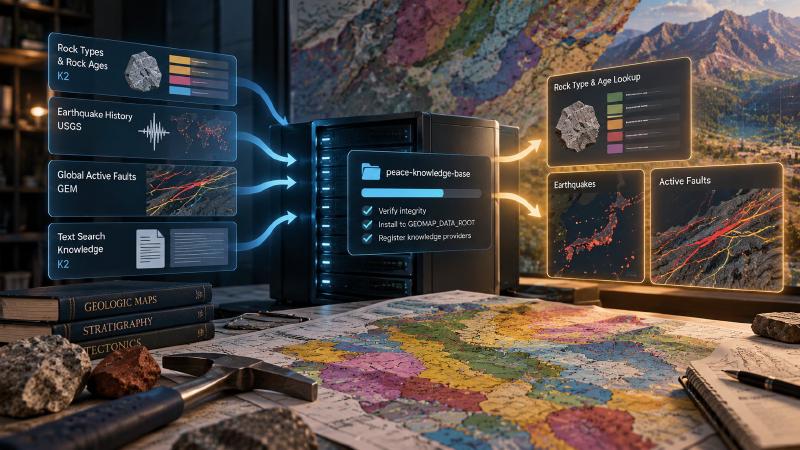
geomap_prepare_knowledge is the knowledge install tool in Stratigraphic Amenity, Eigenform’s open-source (MIT) MCP server for scanned geologic maps. It downloads one asset, peace-knowledge-base, the geological database behind several of the server’s knowledge providers.
Like the map-detection installer, it takes no inputs. It installs exactly that one entry from the approved list, assets/manifest.toml, into GEOMAP_DATA_ROOT/assets/knowledge. Custom knowledge folders are rejected with knowledge_configuration_mismatch. An operator can hide the tool with GEOMAP_MCP_ENABLE_KNOWLEDGE_PREPARATION=false.
What Is in the Geological Database?
The asset is the dependencies/knowledge folder of Microsoft’s PEACE repository, pinned to one commit and checked against a recorded tree hash.
| Part | Source | Licence |
|---|---|---|
| Five K2 files: rock-type and rock-age lists, plus three for text search | K2 | MIT |
| Earthquake history | USGS | CC0, US public domain |
| Global active faults | GEM | CC BY-SA 4.0 |
Which lookups depend on it
rock_type and rock_age, the two providers behind turning a legend label into a rock type and age, become ready once it is installed. Without it, geomap_enrich_legend fails with missing_knowledge_asset.
The earthquake and fault providers prefer a local mirror of their sources. When none exists, they fall back to the USGS and GEM files from this asset and add a warning. The post on looking up earthquakes and faults covers those records.
Three more providers answer free-text questions from the other K2 files, using a sentence-embedding model. They need this asset and the knowledge-semantic Python extra.
When Should an Agent Install the Geological Database?
The agent guide gives one trigger: a provider the agent needs lacks peace-knowledge-base. A capability check lists that gap for each provider.
A lookup can also fail with missing_knowledge_asset. Its hint reads: “Call geomap_prepare_knowledge on this server after confirming with the user; it downloads approved assets and writes to disk.”
Ask first, and install through the server
The tool goes online and writes to the server’s disk, so the agent asks before calling it. It also adds third-party data under its own licences, including CC BY-SA 4.0 for the fault data, which the user may want to know about.
The agent should never run the installer from its own shell. The hint says why: “it is a different environment from the server.” Files written there never reach the server’s data root, so the provider stays unready.
What Comes Back
The summary counts what is now usable. It starts “Prepared 1 approved knowledge asset(s). N of 10 registered provider(s) are ready.” It then names the ready providers and says “Retry earlier requests to ready providers.” Any provider still blocked follows “Still not ready:”.
That last part matters. The asset does not install Python packages, set credentials, sync source mirrors or guarantee that a region is covered. If some providers stay unready, a warning says they “still require Python packages, credentials, source mirrors, or other configuration.” The agent reports those to the operator instead of calling the tool again.
The result also carries performs_network_access: true and fresh readiness for all ten providers, so the agent can pick its next lookup from it.
FAQs
Does geomap_prepare_knowledge make every provider ready?
No. It installs only the PEACE knowledge asset. The rock-type and rock-age lookups become ready, but the text-search providers also need the knowledge-semantic extra. Mineral, land-cover and population lookups need network or Earth Engine access instead. The result lists which providers are ready and which are not.
What if the tool is not in my MCP client?
The operator has hidden it with GEOMAP_MCP_ENABLE_KNOWLEDGE_PREPARATION. A missing-asset error then asks the operator to install peace-knowledge-base in the server environment or re-expose the tool. The agent should report that requirement to the user and operator, not run the installer from its own shell.
Is it safe to call twice?
Yes. The tool is idempotent: when the asset’s files are already in place, it reports already-installed and downloads nothing. A run that fails while unpacking leaves no partial install behind. Instead, the call returns asset_install_failed with a trace ID, which the operator can match in the server log.
Where does the earthquake and fault data come from?
From the same PEACE asset: USGS earthquake history, which is public domain, and the GEM Global Active Faults database, under CC BY-SA 4.0. The providers use these files only when no local mirror of the source exists, and say so in a warning. Each record’s provenance names its source.
Try It With Geocluster
Stratigraphic Amenity is one of the Geocluster tools, MCP servers that let AI agents work with geology data and maps.