TL;DR
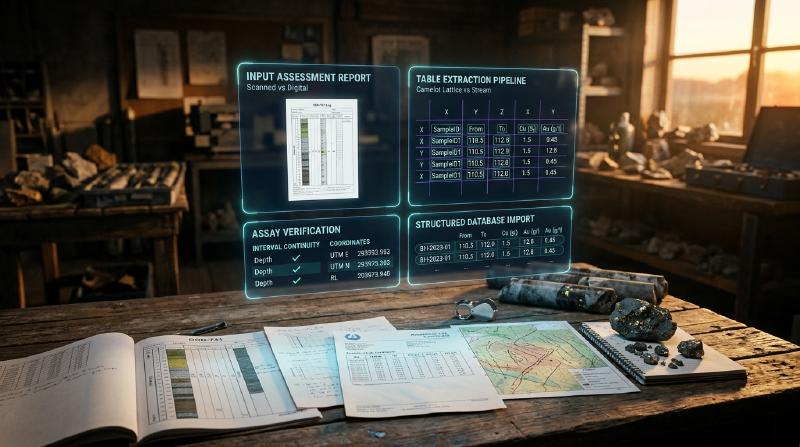
Looking to execute pdf table extraction on assay and drillhole tables from geological reports into clean spreadsheets? Geological reports feature multi-page grids, borderless layouts, and scanned historical pages that frequently break standard document parsers. Therefore, this guide covers how to choose the right extraction method, handle scanned documents, and run automated verification checks that catch silent data errors.
Key Takeaways
- PDF table extraction for geological reports turns locked paper logs and digital filings into clean exploration spreadsheets. The open-source GeoCluster research harness provides automated tools and agent workflows for reading exploration documents and structuring historical datasets.
- Digital and scanned exploration documents demand fundamentally different extraction tools. Computer-generated documents allow direct text reading, whereas scanned paper reports require optical character recognition to read letter and number images.
- Table extraction errors happen silently without triggering software error warnings. Merged columns, omitted assay intervals, and swapped digits look like authentic values until systematically cross-checked against original document images.
- Automated checks and source tracking protect downstream geological resource models. Recording the original assessment report number, page index, and document coordinates alongside every extracted value preserves complete regulatory auditability.
Mineral exploration teams frequently execute pdf table extraction across archives of historical assessment reports, drilling logs, and laboratory certificates locked in PDF documents. Consequently, manually copying interval assays and collar coordinates into database tables is labor-intensive and prone to human transcription mistakes.
Therefore, automating this pipeline through programmatic extraction accelerates regional data compilations and target generation. However, geological tables present distinct layout challenges that generic invoice and office parsers are rarely engineered to handle.
What makes assay tables in geological reports hard to extract?
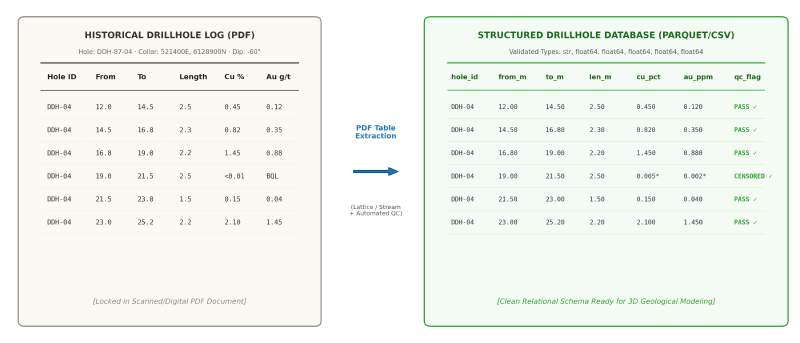
Assay tables in geological reports are difficult to extract because they combine borderless column grids, multi-page splits, and mixed alphanumeric notations such as detection limits. Historical reports frequently feature typewriter misalignments, uneven column spacing, rotated maps, and scanned pages that defeat generic text extractors and cause silent column merge errors.
Specifically, historical drill logs frequently omit vertical cell borders, relying solely on whitespace offsets to separate adjacent assay columns. As a result, standard line-detection parsers fail to isolate individual element fields, causing adjacent intervals to merge into continuous strings.
Furthermore, multi-page tables regularly span dozens of consecutive pages, where column headers often change abbreviations, drop units of measure, or disappear entirely. In addition, assay columns combine floating-point grades with censored below-detection indicators, such as <0.01 or BQL.
Exploration geologists encounter similar document challenges when digitising old geological maps and extracting geospatial features from legacy survey attachments.
Similarly, automated geological map processing pipelines must likewise untangle dense spatial annotations from raster documents.
Step 1: Check document structure for PDF table extraction
Before choosing an extraction tool, developers must determine whether the PDF contains a vector text layer or consists purely of scanned raster imagery. In practice, applying digital vector extractors to scanned pages returns empty strings, while running optical character recognition on clean vector files introduces unnecessary transcription noise.
Therefore, a rapid preliminary check tests whether text characters can be highlighted with a cursor or selected in a PDF viewer. However, programmatic pipelines require automated inspection routines to classify incoming assessment files reliably.
In the GeoCluster research harness backend, PDF ingestion is managed through bounded subprocess calls to poppler-utils. Specifically, the engine first invokes /usr/bin/pdfinfo with UTF-8 encoding to inspect metadata and verify document encryption:
import subprocess

def inspect_pdf_stream(pdf_path: str) -> dict:
    """Inspect PDF metadata and text layer availability using poppler utilities."""
    # Pre-flight check for encryption using pdfinfo
    info_proc = subprocess.run(
        ["/usr/bin/pdfinfo", "-enc", "UTF-8", pdf_path],
        capture_output=True,
        text=True,
        timeout=10,
    )
    if "Encrypted: yes" in info_proc.stdout:
        raise ValueError("PDF is encrypted; provide an unlocked PDF.")

    # Extract layout plaintext via pdftotext
    text_proc = subprocess.run(
        ["/usr/bin/pdftotext", "-layout", "-enc", "UTF-8", pdf_path, "-"],
        capture_output=True,
        text=True,
        timeout=10,
    )
    raw_text = text_proc.stdout.strip()

    return {
        "has_text_layer": len(raw_text) > 0,
        "character_count": len(raw_text),
        "page_count": raw_text.count("\x0c") + 1 if raw_text else 0,
    }
The -layout argument in pdftotext is critical because it preserves physical column whitespace offsets and table structures across adjacent fields. Consequently, if pdftotext yields zero extractable characters, the document consists of raster images and requires optical character recognition.
Furthermore, Eigenform evaluates text extraction fidelity by measuring words per page, the proportion of non-alphanumeric junk tokens, and corrupted numeric sequences. These quantitative checks identify degraded embedded OCR layers before damaged numbers enter exploration benchmarks, as documented in our study on text extraction from geology report PDFs.
Step 2: Choose a PDF table extraction tool
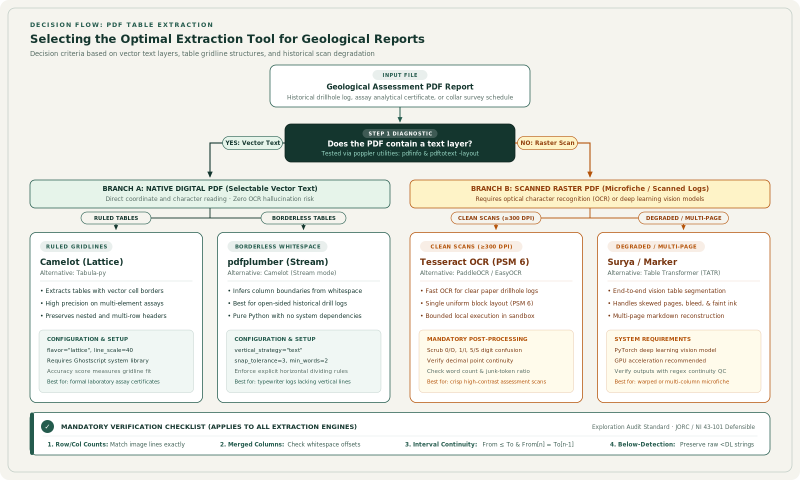
Selecting how to extract tables from pdf reports depends on document structure and whether tables have explicit ruling lines. In practice, tools engineered for ruled financial statements behave very differently on borderless drillhole logs.
Therefore, the comparative matrix below outlines the primary open-source and commercial libraries based on documented features and published evaluations:
| Tool | Ruled Tables | Borderless Tables | Scanned PDFs | Multi-Page Stitching | Setup Requirements |
|---|---|---|---|---|---|
| pdfplumber | Supported | Excellent (text stream tuning) | No (text layer only) | Programmatic loop in Python | Pure Python package (pip install pdfplumber) |
| Camelot | Excellent (Lattice mode) | Moderate (Stream mode) | No (text layer only) | Manual loop across page ranges | Requires Ghostscript and Tkinter |
| Tabula | Strong | Moderate | No (text layer only) | Native page-range argument | Requires Java runtime (tabula-py) |
| PyMuPDF | Basic bounding boxes | Requires custom clustering | No (text layer only) | Custom Python script | C-binding library (pip install pymupdf) |
| unstructured | Supported | Moderate | Yes (via Tesseract backend) | Automated document partitioning | Heavy Python package with system dependencies |
| Surya / Marker | Excellent | Excellent (vision-based) | Yes (built-in vision model) | Built-in layout reconstruction | PyTorch and GPU recommended |
| TATR (Table Transformer) | High fidelity | High fidelity | External OCR required | Requires custom stitching script | PyTorch and Hugging Face Transformers |
| LLMWhisperer | High accuracy | High accuracy | Yes (cloud OCR engine) | Built-in multi-page processing | Commercial SaaS API (vendor benchmark) |
Independent academic research by Adhikari and Agarwal (2024) evaluated ten general parsing libraries across financial, legal, tender, and scientific documents. Their benchmarks demonstrated that deep-learning models such as Table Transformer achieve superior layout consistency on irregular government forms, whereas programmatic tools like Camelot and pdfplumber offer the highest precision on clean vector files. In addition, vendor benchmarks, such as those published by Unstract, highlight pdfplumber for digital files and Surya for scanned documents, though vendor evaluations should be independently validated on geological datasets.
Extracting digital tables with Camelot and pdfplumber
For digital reports containing clear cell borders, Camelot lattice mode provides dependable table bounding:
import camelot

def extract_ruled_assay_table(pdf_path: str, pages: str = "1-end") -> list:
    """Extract ruled assay tables using Camelot lattice mode."""
    tables = camelot.read_pdf(
        pdf_path,
        pages=pages,
        flavor="lattice",
        line_scale=40,
        strip_text="\n",
    )
    return [table.df for table in tables if table.accuracy > 85.0]
Where historical reports lack bounding cell lines, pdfplumber enables fine-grained control over horizontal and vertical character alignments:
import pdfplumber
import pandas as pd

def extract_stream_drillhole_log(pdf_path: str, page_idx: int) -> pd.DataFrame:
    """Extract borderless drillhole logs using spatial character positioning."""
    with pdfplumber.open(pdf_path) as pdf:
        page = pdf.pages[page_idx]
        table_settings = {
            "vertical_strategy": "text",
            "horizontal_strategy": "lines",
            "snap_tolerance": 3,
            "join_tolerance": 3,
            "min_words_vertical": 2,
        }
        extracted = page.extract_table(table_settings)
        if extracted and len(extracted) > 1:
            return pd.DataFrame(extracted[1:], columns=extracted[0])
    return pd.DataFrame()
Scanned PDF table extraction workflows
Extracting data from scanned geological reports requires optical character recognition before table geometries can be resolved. Scanned historical reports suffer from paper yellowing, ink bleed-through, faded typewriter ribbons, and physical archive stamps that degrade character recognition accuracy.
A significant hazard in scanned pdf table extraction is letter-for-digit substitution. Typewritten historical assessment reports frequently exhibit visual ambiguities where specific characters are misread:
- Numeral 0 versus capital O: The letter O is inserted into floating-point numbers, converting
10.5into1O.5or10.O, causing numeric database loaders to fail. - Numeral 1 versus lowercase l or capital I: Core interval values like
11.0are converted intoll.0orI1.0. - Numeral 5 versus capital S: Exploration grade values such as
0.52ppm are converted into0.S2ppm. - Numeral 8 versus capital B: An assay grade of
8.4g/t gold becomesB.4g/t. - Decimal points dropped or converted to commas: A critical gold grade of
1.25oz/ton is read as125oz/ton or1,25oz/ton, altering reported resource grades by two orders of magnitude.
To mitigate optical distortion, modern extraction pipelines pass scanned page images through de-skewing, contrast normalization, and adaptive binarization algorithms before applying layout segmentation models.
Step 3: Extract data from geological reports and keep its source
In exploration geology, preserving source provenance is a fundamental technical standard. Professional reporting codes such as JORC and NI 43-101 require defensible audit trails to support mineral resource estimates. Consequently, every extracted numeric interval must link back to its origin report identifier, document page, and table index.
In GeoCluster, every extracted observation is indexed with evidence anchors in the format [source: reports/report.pdf | p:N]. As a result, this structure ensures that downstream modeling workflows can trace any anomaly directly back to the primary laboratory certificate.
When compiling regional databases, engineers should structure extraction records with immutable provenance metadata:
def create_provenance_record(
    report_id: str,
    page_number: int,
    table_index: int,
    hole_id: str,
    from_depth: float,
    to_depth: float,
    element: str,
    raw_value: str,
    extraction_method: str,
) -> dict:
    """Structure an extracted assay measurement with complete source provenance."""
    return {
        "report_id": report_id,
        "page_number": page_number,
        "table_index": table_index,
        "source_anchor": f"[source: {report_id} | p:{page_number}]",
        "hole_id": hole_id,
        "from_depth_m": from_depth,
        "to_depth_m": to_depth,
        "element": element,
        "raw_value_string": raw_value,
        "extraction_method": extraction_method,
    }
Retaining raw character strings alongside converted floating-point numbers ensures that future audits can verify whether an entry was an authentic zero, a missing assay, or a censored value below detection.
Step 4: Check assay tables pdf data against the original report
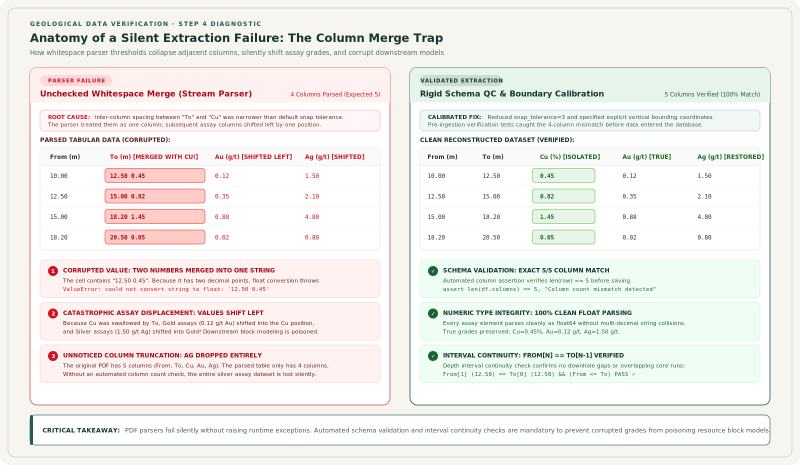
Because PDF parsers fail silently without raising program errors, automated verification scripts are essential to maintain data integrity. Unchecked extraction errors migrate through spatial modeling pipelines and introduce false exploration targets.
Specifically, the Alberta Geological Survey highlighted these exact risks when releasing digital drillhole data compiled from 328 historical mineral assessment reports (AER/AGS Digital Data 2024-0022). The survey explicitly cautioned users that extracted datasets contain legacy transcription errors and unit ambiguities, urging geologists to independently verify values against original report documents before committing exploration capital.
Therefore, exploration teams should implement an automated checklist covering six primary verification steps:
- Row and column counts: Verify total parsed rows and column lengths directly against the original page image to ensure no rows were dropped during parsing.
- Merged columns: Check character positions and line lengths to catch merged fields, such as
ToandCucolumns merging into a single whitespace-delimited cell. - Page-break continuation rows: Reconcile repeated headers, continuation titles, and multi-line sample descriptions across page boundaries.
- Units and unit conversions: Confirm whether grades are reported in ppm, ppb, weight percent, or troy ounces per ton before loading.
- Below-detection ("<DL") values: Preserve raw inequality strings (
<0.01or<5) instead of stripping signs or converting values to zero. - Interval totals and continuity: Verify that downhole intervals are contiguous (From ≤ To, From[n] = To[n-1]) and sum to the total drillhole depth.
The following script demonstrates automated continuity and column-merge verification across extracted intervals:
import pandas as pd
import numpy as np

def verify_drillhole_continuity(df: pd.DataFrame) -> dict:
    """Run automated structural checks across extracted drillhole intervals."""
    anomalies = {"interval_gaps": [], "sign_inversions": [], "merged_columns": []}
    sorted_df = df.sort_values(by=["hole_id", "from_depth_m"]).reset_index(drop=True)

    for i in range(1, len(sorted_df)):
        if sorted_df.loc[i, "hole_id"] != sorted_df.loc[i - 1, "hole_id"]:
            continue

        prev_to = sorted_df.loc[i - 1, "to_depth_m"]
        curr_from = sorted_df.loc[i, "from_depth_m"]
        curr_to = sorted_df.loc[i, "to_depth_m"]

        # Test downhole interval continuity
        if not np.isclose(prev_to, curr_from, atol=0.01):
            anomalies["interval_gaps"].append((sorted_df.loc[i, "hole_id"], prev_to, curr_from))
        if curr_to <= curr_from:
            anomalies["sign_inversions"].append((sorted_df.loc[i, "hole_id"], curr_from, curr_to))

        # Detect merged columns through whitespace separation checks
        val_str = str(sorted_df.loc[i, "raw_value_string"])
        if len(val_str.split()) > 1:
            anomalies["merged_columns"].append((i, val_str))

    return anomalies
Data engineering teams can orchestrate these programmatic checks within a specialized geology AI agent to automate batch verification across regional assessment archives.
Step 5: Load historical drilling data into a drillhole database
Once extracted tables pass verification, they are loaded into relational exploration databases. In particular, standard drillhole architectures decouple collar coordinates, downhole survey trajectories, lithological descriptions, and multi-element geochemical assays into related tables linked by a unique Hole_ID.
[COLLAR TABLE]
Hole_ID (Primary Key) | Easting | Northing | Elevation | Total_Depth | Lease_ID

        │ 1:Many
        ▼
[SURVEY TABLE]
Hole_ID (Foreign Key) | Depth | Dip | Azimuth | Survey_Method

        │ 1:Many
        ▼
[ASSAY TABLE]
Hole_ID (Foreign Key) | Sample_ID (Primary Key) | From | To | Analyte | Grade | Unit | Source_Anchor
Before appending extracted records into central exploration archives, geologists must verify historical drillhole coordinates and collar elevations. Validating legacy borehole collar locations against digital elevation models and historical lease maps prevents misallocated drill traces, following the protocols detailed in our guide on how to verify historical drilling data.
Moreover, implementing formal geological data management procedures ensures that relational integrity is maintained across collar, survey, and assay tables.
Similarly, database compilation methodologies were applied when using AI recovering borehole data from Soviet-era geological maps to resurrect historical mineral deposits.
Analysing assay data once it is out of the PDF
Once extracted and validated, structured exploration tables can be loaded directly into modern geology data analysis software. Specifically, GeoCluster supports diverse exploration file formats, including CSV, TSV, XLS, XLSX, and PDF documents.
In geochemical analysis, handling censored values and compositing requires strict analytical rules. For example, GeoCluster treats below-detection assays as half the detection limit and calculates length-weighted composite averages across drillhole intervals.
Importantly, the system maintains strict evidence traceability, ensuring raw laboratory measurements remain distinct from subsequent geological interpretations.
FAQs
How do I extract a table from a PDF?
To extract a table from a digital PDF, use programmatic Python libraries like Camelot for ruled tables or pdfplumber for borderless layouts. For scanned PDFs, pass the page image through an optical character recognition model before reconstructing table grid boundaries.
What is the best tool for PDF table extraction?
The best tool depends on the underlying document format. Camelot is the most accurate library for digital PDFs with clear grid borders, pdfplumber offers the highest control for borderless digital layouts, and vision models like Surya or Table Transformer are best for scanned documents.
Can I extract tables from a scanned geological report?
Yes, but scanned reports require optical character recognition to extract character data from raster page images. After running an OCR pipeline, table structures are reconstructed using bounding box coordinates, and numeric outputs must be checked systematically for common letter-for-digit misreadings.
Why do extracted assay tables have merged columns?
Assay tables have merged columns when extraction tools fail to detect whitespace boundaries between borderless data fields. In borderless geological logs, standard scrapers interpret small column gaps as spaces between words rather than separate cell delimiters, concatenating adjacent values into single strings.
How do I check that extracted assay values are correct?
Check extracted tables by running automated interval continuity checks where the top of each interval matches the base of the previous row. Verify row counts against original page images and ensure numeric assay ranges match expected regional geochemical limits.
Can AI extract tables from PDFs accurately?
Modern visual language models and deep-learning table transformers accurately recognize complex, irregular table layouts. However, they can still misread numeric digits on low-contrast historical scans, requiring automated deterministic validation scripts before importing records into central exploration databases.
What should I record about each extracted table?
Record the original assessment report identifier, the source PDF page number, the sample ID, and the bounding box coordinates for each extracted row. Preserving this provenance metadata ensures future technical audits can trace every assay back to primary field records.
Try It With Geocluster
GeoCluster is a browser-based AI agent for geological investigation, available in open-source and enterprise editions. It processes PDF geological reports, spreadsheets, and drillhole tables directly, keeping raw analytical measurements strictly separate from interpretation while maintaining full evidence traceability.