Key Takeaways
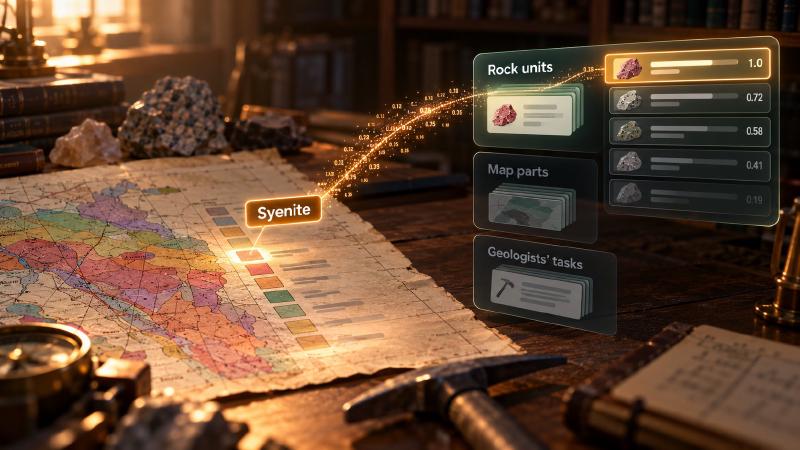
- Semantic search finds stored notes by meaning rather than by exact words. This geological AI feature lets an AI assistant search three sets of notes that come with Stratigraphic Amenity, a free map server (a program that lets AI assistants work with scanned geologic maps): notes on rock units named in map legends (the colour key of a geologic map), notes on what each part of a map is for, and notes on how geologists approach tasks such as judging landslide danger.
- You use it when the assistant needs background it should not make up, such as what a legend unit is. Without it, someone looks each unit up in a reference by hand, or the assistant guesses. Instead, it hands back the closest stored notes with a score (how close the meaning is), so the assistant can quote a source.
- It stays off until someone installs extra software and the note files, and even then you must ask for it by name. It always returns the closest notes it has, even when none of them fits.
- The shipped notes are an example set from a research project. Many are short, and most show signs of being machine-generated. You can swap in your own. A weak or empty result does not mean the knowledge does not exist.
TL;DR
Give this geological AI tool a short phrase, such as a rock name or the name of a map part. From each note set you ask for, it returns up to five stored notes closest in meaning, each with a similarity score, where 1 means the same meaning. Nothing runs unless you ask for it by name, and the closest note is not always a relevant one.
What Is Semantic Search in Stratigraphic Amenity?
Semantic search in Stratigraphic Amenity, Eigenform’s open-source (MIT) MCP server for scanned geologic maps, is a group of three knowledge providers that compare a short text, by meaning, with the name or question stored with each geological note. A Sentence Transformers model turns both into an embedding, a list of numbers, and the best-matching notes come back ranked.
The three providers are rock_knowledge, component_usage_knowledge and downstream_task_knowledge. They sit behind geomap_query_knowledge, the tool for looking up earthquakes, faults and minerals for a bounding box. Unlike those providers, they take query_text instead of an area, and all three are off by default.
Their notes come from the K2 files of Microsoft’s PEACE project, the research Stratigraphic Amenity builds on. Entry counts are from the files the server installs (PEACE revision da99484):
| Provider | What it searches | Entries | How your text is phrased |
|---|---|---|---|
rock_knowledge | Legend entries, mostly rock units, each with a short note | 3,079 | As you wrote it |
component_usage_knowledge | What each map part is for: title, legend, scale, cross section, stratigraphic column, index map, main map | 7 | “What is the function of {query} in geologic maps?” |
downstream_task_knowledge | How geologists approach tasks such as earthquake, landslide and flood danger, mineral potential and groundwater | 12 | “How do geologists conduct the task of {query}?” |
How Does Geological AI Search Knowledge by Meaning?
Four steps take an agent from an empty server to ranked notes.
Install the notes and the model library
The notes arrive in peace-knowledge-base, the asset you get by installing the geological knowledge base. The search also needs the knowledge-semantic Python extra, which adds Sentence Transformers and Torch. The install tool cannot add it, so the operator installs it in the server’s environment.
Until both are in place, a capability check lists each provider as not ready, with “install the ‘knowledge-semantic’ extra” among its missing requirements. However, readiness never tests whether the model itself can be downloaded.
Ask for each provider by name
Without include, the server never runs them. A request with only query_text returns zero records and one warning per provider: “Compatible provider ‘rock_knowledge’ was not consulted because it is disabled by default. Retry with include=[“rock_knowledge”].”
The opposite mistake fails too. Include a provider but send no query_text, and the server skips it with “Requested provider ‘rock_knowledge’ does not support this request.” When nothing else can run, the call fails with unknown_provider.
Phrase geological AI queries for each provider
Every included provider receives the same query_text, but each handles it differently. rock_knowledge compares your text, as written, with the names of 3,079 legend entries, so a unit name works best. The other two turn it into a question first and compare it with their stored questions, so pass a map part (“index map”) or a task (“landslide danger”). Only names and questions are compared, never the note text, so a word that appears only inside a note cannot produce a match.
For example, “granite” sent to the map-part provider still returns map-part notes, so include one provider per call.
A geological AI request and its result
The request goes to geomap_query_knowledge and needs no map, area or detector:
{
  "query_text": "Syenite",
  "include": ["rock_knowledge"],
  "max_records_by_provider": {"rock_knowledge": 1}
}
Each record holds key (the stored entry that matched), answer (its note), score and rank. Scores are cosine similarities, so an exact name match should score about 1.0. A record looks like this (illustrative):
{"key": "Syenite", "answer": "Syenite is a type of igneous rock.</s>", "score": 1.0, "rank": 1}The item summary reads “Found 1 semantic K2 matches for query text.” Its provenance records the model and the number of notes searched.
Note the </s> at the end: a leftover end-of-text marker, a sign the note was machine-generated. 2,677 of the 3,079 rock answers carry one, as do all 19 notes in the other two sets, so strip it before quoting.
Geological AI Search Settings and Offline Use
Server settings, not request options, control the search. Passing provider_options fails with “Provider ‘rock_knowledge’ does not accept provider_options.”
| Variable | Default | What it does |
|---|---|---|
GEOMAP_SEMANTIC_MODEL | sentence-transformers/paraphrase-multilingual-MiniLM-L12-v2 | Model name or local path |
GEOMAP_SEMANTIC_TOP_K | 5 | Notes returned per provider |
GEOMAP_SEMANTIC_MIN_SCORE | unset | Drops matches below this score |
GEOMAP_SEMANTIC_DEVICE | auto | auto uses a GPU if Torch finds one; cuda fails without one |
GEOMAP_SEMANTIC_LOCAL_FILES_ONLY | false | Forbids model downloads |
GEOMAP_SEMANTIC_MODEL_REVISION | unset | Pins one exact model version |
Request limits win over GEOMAP_SEMANTIC_TOP_K: max_records_by_provider first, then max_records, then the default of 5. So max_records: 50 gets up to 50 matches from each semantic provider.
The default is a small multilingual Sentence Transformers model that turns text into 384 numbers. The library downloads it from Hugging Face on first use; the search itself runs on the server.
For an offline server, download the model once, then set GEOMAP_SEMANTIC_LOCAL_FILES_ONLY=true. Pin GEOMAP_SEMANTIC_MODEL_REVISION too when results must be repeatable. The first query to each provider embeds its entry names or questions, which later queries reuse until the server restarts.
What Geological AI Agents Should Watch For
Semantic search always answers, which makes it easy to over-trust.
- The closest note is not always relevant. With no
GEOMAP_SEMANTIC_MIN_SCORE, every query returns the top 5, however poor the fit. The map-part set holds only 7 notes, so any question returns 5 of them. With a threshold set, an empty item says “No semantic K2 matches met the configured score threshold.” - Repeats fill slots. 57 rock names appear more than once, adding 70 extra entries. “Syenite” stands for three different units in the source (syenite, syenogranite and syenite porphyry, by their Chinese names) that share one note, filling three of the five default slots.
- The notes are research data, not a reference book. PEACE published them openly (MIT) for its research agent. “Tuanshan Formation” returns a general definition of a formation, and the note for “Silty clay, claystone, sand or gravelly sand” describes silicon, the element, and says nothing about the deposit.
- A model that cannot load fails the call. A model download that fails, or
GEOMAP_SEMANTIC_DEVICE=cudawith no GPU, ends inunknown_providerwith “Provider ‘rock_knowledge’ failed: …” when no other included provider succeeds. - A map question still needs an area. The tool for asking questions about a scanned map passes the question on as
query_text, but fails withgeoref_requiredwithout bounds or legend labels. - No match is not evidence of absence. A weak or empty result says the stored notes lack the answer, nothing about the rocks themselves.
Swapping in your own notes
The three note sets are example implementations, and you can replace them or add more.
- Swap a file (a setting). Point
GEOMAP_K2_ROCK_DETAIL_JSON,GEOMAP_K2_USAGE_JSONorGEOMAP_K2_EXPERTISE_JSONat your own JSON list, such as your country’s stratigraphic lexicon. Each entry needs ananswerplusidfor rock notes orquestionfor the other two. Phrase questions like the templates above, which are fixed in code. - Install the base set first. With any custom K2 path set,
geomap_prepare_knowledgerefuses the whole knowledge asset (knowledge_configuration_mismatch). Installpeace-knowledge-basebefore changing a path, or have the operator runstratigraphic-amenity-assets peace-knowledge-base. The cache tracks each file’s hash, so old results are not reused. - Add a fourth set (a code change). A new provider needs a path and
GEOMAP_*variable inKnowledgeConfig, aProviderRegistrationthat builds aSemanticK2Providerwith its own fields and template, and an entry in the readiness check.
FAQs
Why does my semantic search return no results?
Usually the providers never ran. They are off by default, so add include with the provider name, as the warnings suggest. If they did run, a GEOMAP_SEMANTIC_MIN_SCORE threshold may have removed every match. Neither case means the knowledge does not exist, only that the stored notes held no close match.
Does geological AI search need an internet connection?
Only once. The default Sentence Transformers model downloads from Hugging Face on first use, unless it is already on the server. After that, set GEOMAP_SEMANTIC_LOCAL_FILES_ONLY=true and the search runs fully offline. The server embeds your query text locally and never sends it to an outside service.
Can one server run map detection and semantic search?
No. The detectors extra behind map part detection pins Torch 2.0.1, while knowledge-semantic needs Torch 2.2 or later, so the project declares the two as conflicting. Run two server processes in separate environments. Both can share one data root and the same installed knowledge files, so you install the notes only once.
Can I use my own geological notes?
Yes. The shipped notes are an example set. To replace one set, point its GEOMAP_K2_* variable at your own JSON list with the same fields, for example a national stratigraphic lexicon. Adding a fourth set beside the three is a code change: a config path, a provider registration and a readiness entry.
Try It With Geocluster
Stratigraphic Amenity is one of the Geocluster tools, MCP servers that let AI agents work with geology data and maps.
Before searching a legend’s units by meaning, an agent can turn each legend label into a rock type and age with exact and partial name lookups.