
TL;DR
- An AI’s context window is its working memory for one task: everything it can see at once. Loading a whole data table into it wastes that memory and makes the answers worse.
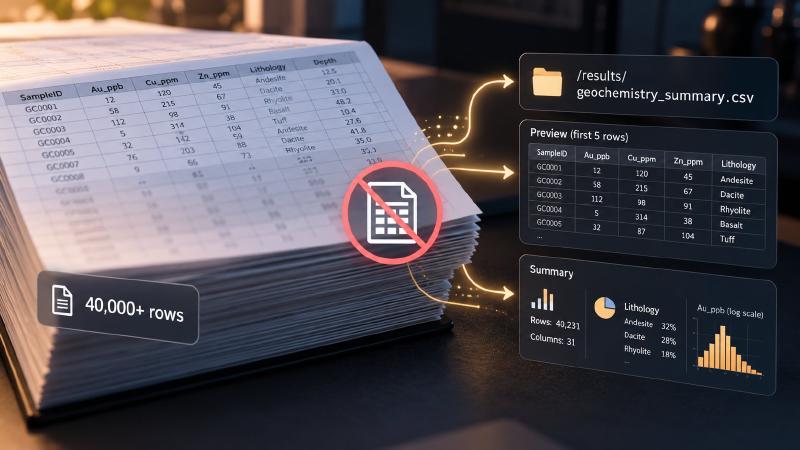
- A good research harness keeps data tables on disk. The AI gets file paths and short summaries instead, and every step that hands text back to it has a size limit. Here we explain how we designed ours.
- Some limits are built into the code, so the AI cannot get around them. Others are only instructions.
Key Takeaways
- Reading a whole table wastes the AI’s working memory. A data file longer than 50 lines comes back as its first 5.
- Tools hand back a file path and a few numbers, not the rows. A preview never returns more than 20 rows, however many are asked for.
- Every step that returns text has a size limit. A helper agent’s result is capped at 8,000 characters, with the full version saved to disk.
- Some limits are code, some are instructions. The code limits hold even when the AI ignores its instructions.
A general-purpose coding agent asked about an assay table will often open the file. For 40 rows that is fine. For 40,000 rows, the table fills the AI agent context window with numbers the model cannot reason over anyway. It pushes out the instructions and findings that matter, and it adds cost to every request that follows.
The Geocluster Research Harness is built for exploration data, where tables are large and analyses run many steps. Below is each place it keeps data out of the model’s context, checked against current code.
What fills an AI agent context window
An AI agent’s context window is the most text, counted in tokens, that its model can take in for one request. Everything shares it: the system prompt, tool definitions, the conversation so far and every tool result. Whatever the agent reads stays there and is sent again with each later request.
However, space is not the only cost. Chroma’s context rot study tested 18 models and found that performance grows increasingly unreliable as input length grows, even on simple tasks. So a window with room left can still be too full to reason in.
For data work, raw rows are the worst thing to put there. The model needs a table’s columns, its size and the results of computations on it, not the rows themselves.
Context window management starts at the file read
The harness wraps the agent’s read_file tool in a guard with two limits. Both are in code, so they protect the AI agent context window whatever the model decides to do.
A line limit for data files
Data files (.csv, .tsv, .json, .jsonl, .ndjson, .xlsx, .xls, .log, .dat and .las) longer than 50 lines return only their first 5 lines, followed by a marker with the file’s total line count. JSON files under 50 KB are exempt, since those are usually configuration.
Reading the 241-line sample geochemistry CSV therefore returns the header and four rows: enough to see the columns, and nothing more. The prompts say the same thing: do not use read_file on data files.
A token budget for every read
Every file also gets a token budget. The guard estimates three characters per token, and a single read may use at most 15% of the model’s usable window, which is the full window minus a safety reserve. On a model with a 200,000-token window, that comes to about 24,000 tokens, roughly 72,000 characters.
Anything beyond the budget is cut with a truncation marker, so one large file cannot reach the context window limit in a single read. Files attached directly to a message get a fixed budget of 20,000 tokens.
The user-facing agent is not given data inspection tools
The agent the user talks to has three data tools in its tool list: list_files, check_missing and a tool that summarises generated artefacts. Tools that describe, preview or query a dataset are deliberately left out. The harness’s design notes record why: inspection tools once returned statistics for 31 columns, 89 element counts and 57 lithology counts in a single turn.
Questions that need a dataset’s contents go to the orchestrator. It hands them to specialist agents running as child processes, each with a fresh context.
MCP tool output: paths and summaries, not rows
The harness’s 45 analysis tools run in a local MCP (Model Context Protocol) server, published separately as Geocluster MCP. They share one output pattern.
Full results go to a results folder
A transform, clustering run or plot writes its full output to a results/ folder next to the input file. It then returns a short JSON object: the output path, and sometimes a few numbers.
For example, cluster on the sample dataset writes data/results/meridian_ridge_geochem_kmeans_3.csv, with a cluster label on every clustered row. It returns only the path and the number of samples in each cluster. The model reasons over three counts and a path, while the labelled rows stay on disk for the next tool to read.
Agents take such summaries literally, a lesson from our MCP tool design for map tools, so a summary has to state the counts that matter.
Preview tools cap their rows
In addition, tools that do return rows cap them. The head, tail and sample operations of query_data return at most 20 rows, whatever number is asked for, and list_files stops at 500 entries with a warning.
Output budgets for specialist agents
Specialists run in their own processes, with their own context. What they send back is not, and the harness limits it at four points.
The results budget
Each specialist finishes with a final result, and its instructions set a budget. It should keep the results object under about 2,000 characters, save anything large to results/ and report the path. It should never dump a DataFrame, a describe() table or a data preview into the result.
The analytics specialist’s rule is more specific: anything per row, such as cluster labels or anomaly flags, goes into a CSV, and the result carries only summary metrics, such as silhouette scores, plus the file path.
Script output goes to files
Specialists try the analysis tools first and write Python scripts only when no tool fits. Scripts are told to run silently, with no intermediate prints, and to put their final answer between ===RESULT=== and ===END_RESULT=== lines.
Command output also has limits in code. A command that runs longer than 30 seconds without a larger timeout is detached, and the model gets the output so far. By default, output returned to the model is capped at 500 lines, half from the start and half from the end. Past 1,000 lines or 512 KB, output goes to a log file, and only its first and last 100 lines stay in view.
The shared rule for every agent with a shell is therefore to redirect output to a file, for example python3 script.py > /tmp/output.txt 2>&1, and read the file afterwards.
Only the final result returns
The orchestrator reads each specialist’s output as a stream of JSON messages and keeps only the final completion message. The specialist’s tool calls, command output and intermediate text never enter the orchestrator’s context.
Caps on results and history
The results object is then capped at 8,000 characters. Entries are kept in order until the total would pass the cap, and each one that does not fit is replaced by a note of its length. The full result goes to a temporary file, and a notice gives the orchestrator its path.
The orchestrator’s prompt also lists only the last 20 dispatches, with their objective, status, duration and errors but no result data. Older dispatches shrink to one line counting successes, errors and pending runs.
Which AI agent context window limits are enforced in code
It helps to know which AI agent context window limits the model cannot get around. Code limits hold even if the model ignores its instructions, while prompt rules work only as far as the model follows them.
| Limit | Where it applies | Enforced by |
|---|---|---|
| Data files over 50 lines return 5 lines | read_file | Code |
| A read uses at most 15% of the usable window | read_file | Code |
| Attached files get 20,000 tokens | Message attachments | Code |
| No data inspection tools for the user-facing agent | Its tool list | Prompt |
Results written to results/, paths returned | MCP tools | Code |
| Row previews capped at 20 rows | query_data | Code |
| 30-second detach; 500-line output cap | Shell commands | Code |
results under about 2,000 characters | Specialists | Prompt |
| Silent scripts; output redirected to a file | Agents with a shell | Prompt |
| Only the final result returns | Dispatch | Code |
results capped at 8,000 characters | Dispatch | Code |
| History of the last 20 dispatches | Orchestrator prompt | Code |
Still, the prompt rules help: they explain the code limits, so the model plans around them instead of hitting them.
No single limit does the job. This is context engineering applied to data: keeping bulk data on disk leaves room for the instructions and evidence the model has to reason with. The read guard is agent/src/core/task/tools/utils/DataFileGuard.ts in the Geocluster Research Harness repository.
FAQs
What is a typical AI agent context window size?
It depends on the model. Current models range from about 128,000 tokens to more than a million. Size is a ceiling, not a target: performance becomes less reliable as input grows, so a larger window does not make it safe to load whole datasets.
What happens when an AI agent’s context window fills up?
The next request fails, or the agent has to drop content. Many agents then compact the conversation by summarising older turns, which loses detail. Answers usually degrade before that point. Our harness keeps its list of past dispatches in the prompt for that reason, so the record of what already ran survives compaction.
What is context window management?
Context window management means deciding what enters a model’s context and in what form. It includes truncating file reads, returning summaries and file paths instead of raw data, capping tool output and compacting history. The aim is to keep the window for the instructions and evidence the model needs to reason with.
Is context engineering the same as context window management?
Not quite. Context engineering is the broader practice of designing everything a model sees: instructions, tools, retrieved documents, memory and history. Context window management is the part concerned with size. Anthropic’s guide to context engineering treats context as a finite resource with diminishing returns.